Tags
Label accounts and contacts with your own words, then filter and group by them across the app.
Where to find it:your-organization.conta.financeAccounts
A tagA free label you put on accounts and contacts, to find and filter them as a group. is a free label that you put on an accountA wallet or an exchange account your organization controls. or a contactAn address you named that belongs to someone else, such as a supplier., such as treasury, payroll or cold storage. An account or a contact can have several tags. Tags change no figure: they help you find, filter and group.
The tags of accounts and the tags of contacts are two separate lists. A tag you create on an account is not offered on a contact.
To compare tags with categories and subcategories, see Categories, subcategories and tags.
Tag an account or a contact
The Tags field is in the New wallet, Edit wallet, New contact and Edit contact forms.
- Open the form. For an account, open the menu at the end of its row on the Accounts page and select Edit.
- In Tags, type the tag and press Enter.
- To add a tag that already exists, select it under Suggestions.
- Save the form.
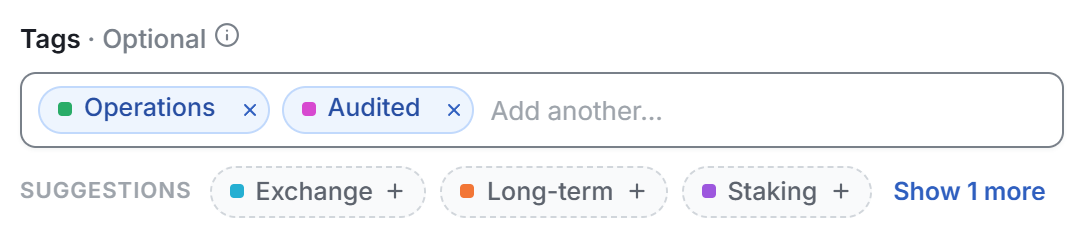
Some details of the field:
- Suggestions are the tags that other accounts already carry, or other contacts for the contact form. Use them to keep one spelling for the team.
- Case does not matter.
Treasuryandtreasuryare the same tag. - To remove a tag, select the cross on its chip. With the text box empty, Backspace removes the last tag.
- The color comes by itself. A new tag gets the color that the tags in the form use least.
A new tag is saved when you save the form. A tag that no account or contact carries does not show in any filter.
To tag many wallets at once, use the tags column of the bulk import. See Import many wallets.
Filter by tag
Each tag filter lists only the tags in use.
| Page | Where | What the filter keeps |
|---|---|---|
| Accounts | All tags in the toolbar of Own accounts and Contacts | Rows that carry at least one of the selected tags. |
| Transactions | All filters > Wallet tags | Transactions of the accounts that carry at least one of the selected tags. |
| Reconciliation | Tags in the toolbar | Accounts that carry every one of the selected tags. |
Transactions and Reconciliation read the tags of accounts only. The tags of contacts do not show there.
See Filter and search transactions and The Reconciliation page.
Value by tag on the Portfolio
The Portfolio page has a Value by tag card. It shows the share of the portfolio value for each account tag. The value of untagged accounts shows in an Untagged row.
An account with several tags counts in each of them. So the rows of the card can add up to more than the portfolio. See The Portfolio page.
Tags in rules
A ruleA set of conditions that gives each matching movement a category, a subcategory or a rollup automatically. can use a tag as a condition. The rule then matches every movement where an account with that tag is on one side. Tag a new account, and the rule covers it with no edit. See Create a rule.