The Portfolio page
The net worth of your organization, how it changes over time, where it sits and how it splits across accounts, tokens, platforms and tags.
Where to find it:your-organization.conta.financePortfolio
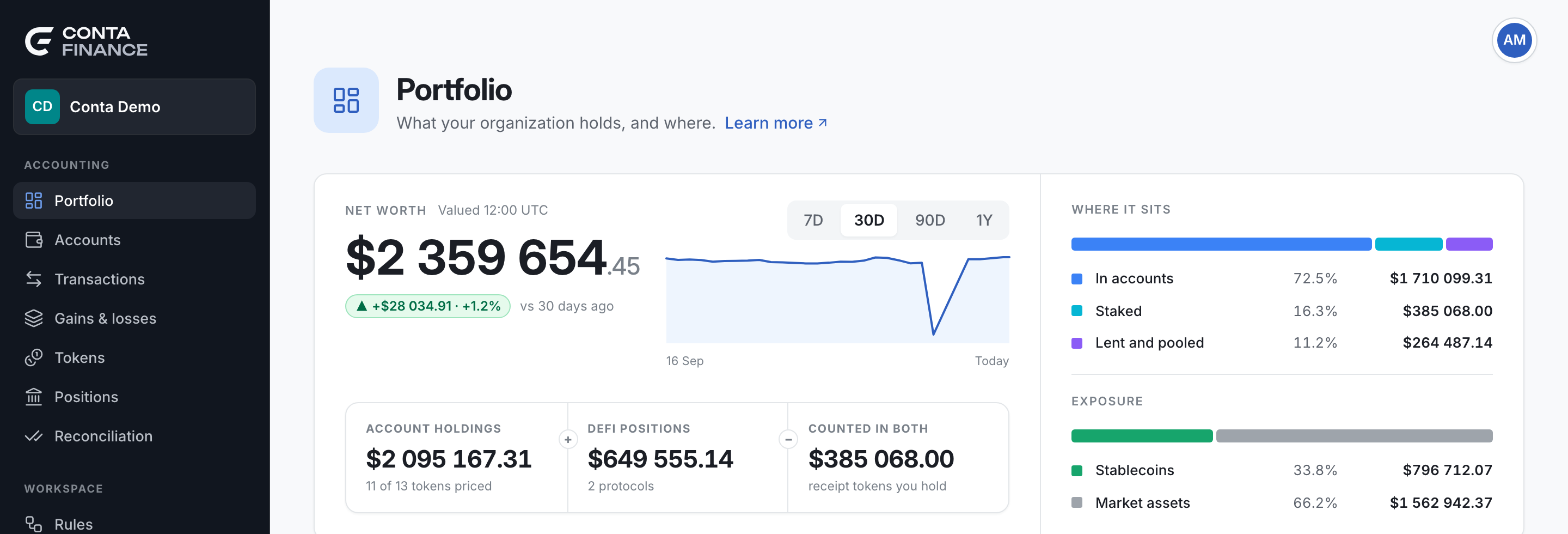
The Portfolio page shows what your organizationOne company with its own books, its own data and its own address. holds, and where. It is the first page that opens. Every figure is in the reporting currencyThe currency of every balance, valuation and report: USD, EUR or GBP. You choose it in Organization settings. of the organization. See Prices and exchange rates.
Net worth
The large figure at the top is the Net worth. Beside the label, Valued and a time in UTC say when the prices were read.
Under the figure, a chip shows how much the net worth changed over the range of the chart, as an amount and a percentage. The text after it says from when: for example "vs 30 days ago", or "since" a day when the history starts inside the range.
The range switch
The buttons above the chart choose the range: 7D, 30D, 90D or 1Y. The page opens on 30D. The chart draws one point for each recorded day, at its close, and a last point for today. Hold the pointer on the line to read the net worth of a day.
A young organization shows sample data
Conta Finance records the net worth once a day. Until it has recorded 7 days, the chart completes the week with sample days before the first real one. The tooltip of a sample day reads "Sample data. Real history shows after 7 days." The change chip also measures from the first point of the chart, so it includes the sample days until the week is recorded.
The band under the net worth
The band explains the figure:
| Cell | What it shows |
|---|---|
| Account holdings | The value of every token your accounts hold. The line under it says how many of the tokens have a price, for example "41 of 45 tokens priced". |
| DeFi positions | The net value of your positionsAn asset your account put to work in a protocol: staked, supplied, added to a pool or locked. It never changes the books. in DeFi protocols and in staking. The line under it counts the protocols, or shows the pending rewards, which are not in the figure. |
| Counted in both | The part of the positions that your accounts already hold as a receipt tokenA token a protocol gives you for a deposit. It stands for the assets inside the protocol.. It is taken away, so it counts once. |
Net worth = Account holdings + DeFi positions − Counted in both. To learn why, see DeFi positions and double counting.
A token with no price adds nothing to Account holdings. See Fix a token with no price.
Where it sits
The bar at the right splits the net worth by where it is:
| Part | What it holds |
|---|---|
| In accounts | Account holdings, without the part counted in both. |
| Staked | Positions of the kinds Staked, Locked and Vesting. |
| Lent and pooled | Positions of the kinds Lending, Farming, Liquidity and Deposit. |
| Other positions | Every other kind of position, such as Rewards. |
A part worth less than a cent does not show. Hold the pointer on a part, on the bar or in the list, to read its share and its value.
Exposure
The second bar, Exposure, splits the net worth in two:
- Stablecoins is the value pegged to a currency: the stablecoins in your accounts, plus the stablecoins your positions supply, minus the stablecoins they borrow.
- Market assets is the rest. Its value moves with the market.
If the positions cannot load, the section reads "Could not load positions."
When the reporting currency is EUR or GBP and the exchange rate of the day is missing, a warning under the head reads "No FX rate for" and the day. Every figure of the page is then in USD, with the USD symbol. The chart of the net worth leaves out the days that have no exchange rate.
The Positions card
The Positions card is a preview of the Positions page. Its info icon reminds you that positions are display only: they never enter the ledger or the cost basis. The subtitle shows when the snapshot of the positions was taken.
The band of the card:
| Cell | What it shows |
|---|---|
| Net value | The net value of every position, as on the Positions page. The line under it names the pending rewards it leaves out. |
| Already in holdings | The part your accounts already hold as receipt tokens. It reads "nothing counted twice" when there is none. |
| Adds to net worth | What DeFi adds to the net worth, and the number of protocols. |
The table lists the five protocols with the most value. Each row shows the Protocol, its Platforms, the number of Accounts, the Net value, the Rewards and its Share of the net value. An in holdings badge marks a protocol whose value is partly in your account holdings already. When there are more protocols, a line under the table counts them. Select View positions to see them all.
Value by account and Value by token
Two cards show a donut and a list.
- Value by account shows the five accounts with the most value. An account is one address, so an address on several platforms counts once. The rest fold into Other accounts. Select View accounts to open the Accounts page.
- Value by token shows the tokens with the most value. The rest fold into Other tokens, so the donut adds up to the account holdings. Select View tokens to open the Tokens page.
Each list shows the value and the share of each row. Hold the pointer on a row or a slice to light it up in both.
Value by platform and Value by tag
- Value by platform shows the share of the account holdings on each platformWhere an asset lives: a blockchain or an exchange..
- Value by tag shows the share of each account tagA free label you put on accounts and contacts, to find and filter them as a group.. An account with several tags counts in each, so the rows can add up to more than 100%. The value of accounts with no tag shows as Untagged. See Tags.
Recent activity and Idle balances
These two cards list each account on each platform.
- Recent activity lists the accounts by their latest movement, newest first. The columns are Account, Last movement, Transactions and Value.
- Idle balances lists the accounts that hold value and have had no movement in 30 days. The account idle the longest comes first. Last movement shows the day, or Never.
An idle balance is not an error. Cold storage is idle on purpose. The list helps you find a forgotten remainder, or an account that nobody controls anymore. When every account with value moved in the last 30 days, the card says so.