The Positions page
The assets your accounts hold inside DeFi protocols and in staking, grouped by protocol, and what they add to the net worth.
Where to find it:your-organization.conta.financePositions
A position is an asset your accountA wallet or an exchange account your organization controls. put to work outside the account itself: staked with a validator, supplied to a lending market, added to a liquidity pool, or locked for a period. The Positions page lists every position of every account, with one row per protocol.
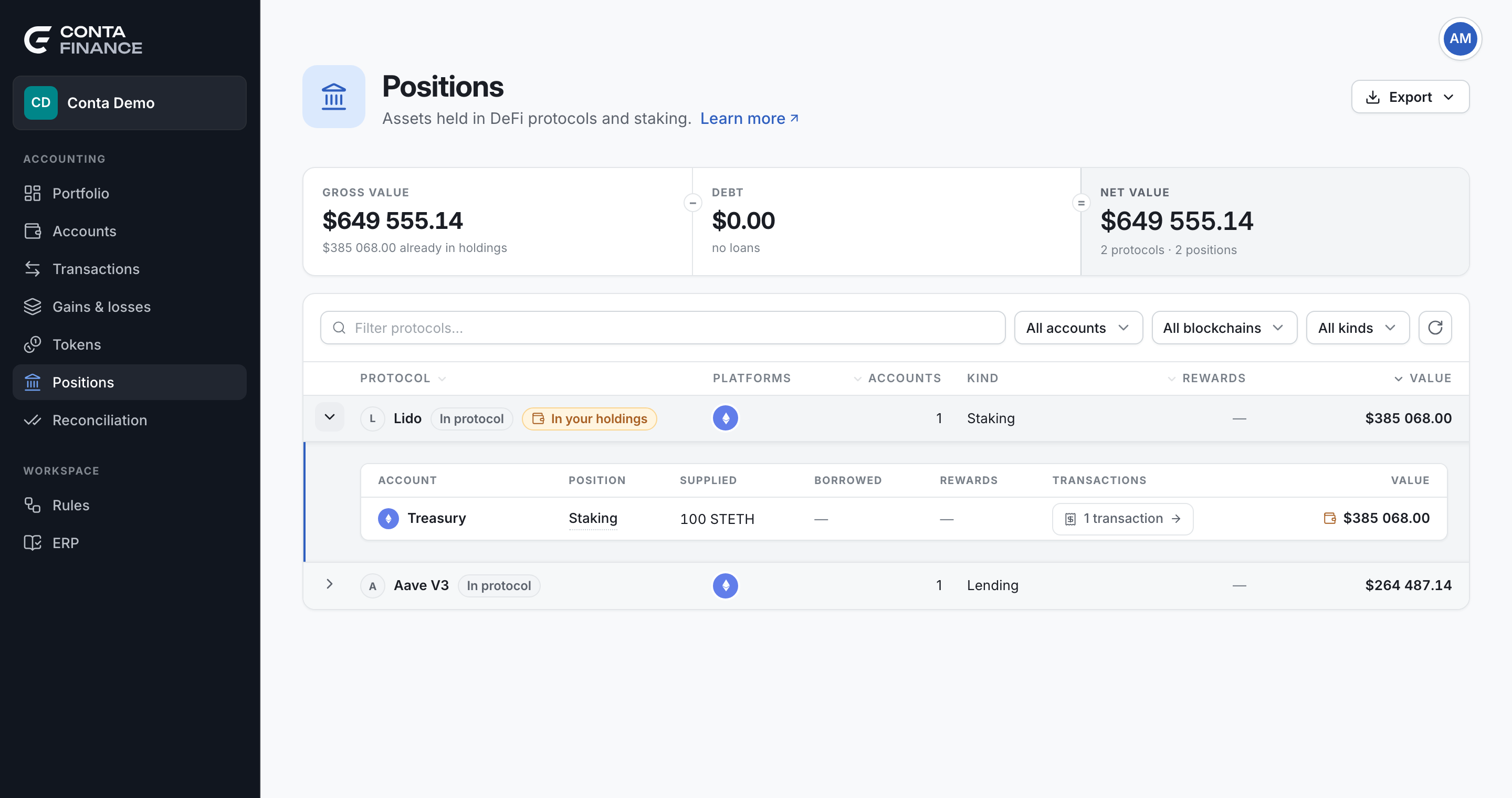
The band
The band at the top reads as one sum, Gross value − Debt = Net value:
| Cell | What it shows |
|---|---|
| Gross value | The value of the positions, in protocols and in staking. The line under it says how much of it your accounts already hold as a receipt tokenA token a protocol gives you for a deposit. It stands for the assets inside the protocol., for example "€449 190.48 already in holdings". |
| Debt | What the open loans owe. It reads "no loans" when there is none. |
| Net value | The gross value less the debt. The line under it counts the protocols and the positions. |
What the positions add to the net worthThe value of everything your organization holds: the account holdings plus the DeFi positions. A value in both counts once. is the net value less the part already in holdings: the Portfolio page shows it. The band adds up only the rows on screen, so a filter changes it. To learn why some value is already in holdings, see DeFi positions and double counting.
The toolbar
| Control | What it does |
|---|---|
| Filter protocols… | Searches the protocols by name. |
| All accounts | Keeps the positions of the accounts you tick. |
| All blockchains | Keeps the positions on the blockchains you tick. |
| All kinds | Keeps the positions of the kinds you tick. |
| Show small positions | Shows the positions worth less than a cent. The label counts them, for example Show 3 small positions. It shows only when there are some. |
| Refresh positions | The round arrow at the right end. It fetches the positions again. See Refresh the positions. |
A small position is one whose tokens all have a price and whose total is under a cent, such as the last unit a closed stake leaves behind. A position with a token that has no price is never hidden.
Export in the header writes the positions on screen as Excel or CSV, with one line for each position of each account.
The kinds of position
Hold the pointer on the name of a position to read what its kind means.
| Kind | What it is |
|---|---|
| Staked | Assets you staked with the protocol, earning while they stay there. |
| Lending | Assets you supplied to a lending market, and anything you borrowed against them. |
| Liquidity | Your share of a liquidity pool, held as the two sides of a trading pair. |
| Farming | A pool position put to work for extra rewards on top of its trading fees. |
| Deposit | Assets you deposited into the protocol and can take back out. |
| Locked | Assets locked for a period. They cannot move until the lock ends. |
| Vesting | Tokens granted to you that unlock over time. |
| Rewards | Rewards you earned and did not claim yet. Nothing moves on chain until you claim them. |
| Other | A position the source reports without a kind. |
The protocol rows
Each row is one protocol, whatever the number of accounts and blockchains that use it. Eight accounts that stake through the same protocol make one row. The native staking of a blockchain is its own protocol, one row for each blockchain, such as "Cosmos Hub staking" or "Celestia staking".
| Column | What it shows |
|---|---|
| Protocol | The name and mark of the protocol, its custody badge, and In your holdings when part of its value is already in your account holdings. |
| Platforms | The blockchains the protocol holds your assets on. |
| Accounts | How many of your accounts have a position in it. |
| Kind | The kinds of its positions. |
| Rewards | The value of the rewards not claimed yet. |
| Value | The net value of its positions. |
| Transactions | A link to the transactions behind the protocol. See From a position to its transactions. |
Select Protocol, Accounts, Rewards or Value in the header to sort. The table opens by value, largest first.
Custody: Chain-held or In protocol
The custody badge says where the assets are:
- Chain-held: the blockchain itself holds the assets for the account, as in native staking. No protocol contract is in between.
- In protocol: the assets are inside a protocol contract, such as a vault, a liquidity pool or a lending market. The account holds a claim on them.
Custody does not tell you if the value is already in your holdings. A chain-held stake is usually not in the account balance, and an in-protocol stake can be, through its receipt token. The In your holdings badge answers that question.
The positions of a protocol
Select a row to expand it. The panel lists each position of each account:
| Column | What it shows |
|---|---|
| Account | The account and its blockchain. A stale badge means the last fetch for this account failed, or that a part of it could not be read. Its tooltip gives the reason. The figures of the account can be out of date: for a part that could not be read, the page keeps the last values it had. |
| Position | The name of the position, a Health badge for a loan, and the source's own code for the kind of position. |
| Supplied, Borrowed, Rewards | The tokens and their amounts. |
| Transactions | The transactions of this account with the protocol. |
| Value | The net value of the position. A wallet beside it means your account holds its token, so the value already counts in your portfolio. When only part of it does, the wallet and that amount show under it. |
The Health badge shows only when the position borrows. It is the distance to liquidation: above 2 there is room, under 2 it is worth watching, and at 1 the collateral is seized.
Select a token to open its page. A token can also carry a mark:
- no price: nothing prices the token, so it adds nothing to the figures.
- A warning icon: the token is not in the catalog. Select the icon to add it.
- not counted (on the position): the position owes a token that has no price, so its debt is unknown. The position adds nothing to the totals until the token has a price. Its amounts stay visible. Price the token to count the position.
- price it: the token is in the catalog but nothing prices it. If it stands for a token that has a price, select it to make it follow that token. See Fix a token with no price.
Liquidity pools on Osmosis
For an account on Osmosis, a position in a liquidity pool lists the assets the position redeems for, not the pool share. Three kinds show:
- A concentrated liquidity position shows its two assets and the fees and incentives you can claim.
- A classic pool share shows the assets it redeems for. The share can sit in the account, be locked, or be unlocking. A locked or unlocking share is not in the account balance, and the position says so.
- A share of a CosmWasm pool (a transmuter or an Astroport pool) shows the assets it redeems for. The share can sit in the account, be locked, or be unlocking, as for a classic pool.
- A locked share of a concentrated pool keeps the amount of shares and no assets, and its name says that the pool is concentrated.
The value uses the price of each asset. A pool share has no market price, so its value never comes from the share. When an asset of the pool has no price, the position stays on the page with its amounts and adds no value until the asset has one. See Fix a token with no price.
Protocols on Terra
For an account on Terra, Conta Finance reads four protocols. Each one shows the assets the position redeems for and the price of each asset:
- Astroport: liquidity pair tokens (LP). An LP staked in the incentives contract shows with its pending rewards. An LP that sits in the account shows when the account sent coins straight to the pair. An LP that you added in the Astroport app and did not stake is not found.
- Eris Protocol and BackBone Labs: liquid staking. A receipt token (ampLUNA, bLUNA) shows the LUNA it redeems for at the rate of today. Each unbond request is its own position and shows when it ends. The Eris arb vault and the Eris amp compounder farms show in the same protocol.
- SOLID: a loan against collateral. The position shows the collateral, the loan and the distance to liquidation. The SOLID coin has no price, so the loan shows its amount and no value, and the position reads not counted: it adds nothing to the totals until SOLID has a price.
These tokens are not in the account holdings, because the ledger does not read the CW20 tokens of Terra. So their value is additional to the net worth. Many of these tokens have no price yet: the position then shows the amount and no value. See Fix a token with no price.
Stride, the Cosmos Hub, Noble, Neutron and Archway
Other Cosmos protocols show the same way: the assets the position redeems for, or the amount when nothing prices them.
- Stride: liquid staking. A Stride token (stATOM, stTIA, stOSMO) that sits in an account on any Cosmos blockchain shows the coins it redeems for at the rate of today. The token is also in the account holdings, so the row reads Already in holdings and adds nothing to the net worth. When nothing prices the token, the position shows the value of the coins it redeems for. A redemption that is not finished shows as Redemption pending on the account that will receive the coins, and adds its value, because the tokens left the balance.
- Cosmos Hub: a tokenized share of a delegation shows the ATOM it redeems for. The account holds the share, nothing prices it, and the position adds its full value. The shares of one validator show as one position, with the number of records in its name. The rewards of a share you created show as claimable.
- Noble: the yield of USDN that you did not claim. The USDN balance stays in the account holdings.
- Eris Protocol and BackBone Labs on Osmosis: a receipt token (ampOSMO, boneOSMO) reads as already in the holdings, and an unbond request shows when it ends.
- Astroport on Neutron: liquidity pair tokens in staking, and tokens that sit in the account. A pair token that you added in the Astroport app and did not stake can be missed.
- Astrovault on Archway: liquidity pair tokens locked in a pool, with their pending rewards. A pool of two similar tokens (a stable pool) shows the amount of pair tokens and no assets, because its value is not a share of the pool.
Neutron, Archway and Noble show positions only when your organization has added the blockchain.
Protocols on Sui
For an account on Sui, Conta Finance reads native staking and the protocols below. Each position shows the assets it redeems for. When nothing prices an asset, the position shows the amount and no value.
- Liquid staking: Haedal (haSUI), Volo (vSUI), Aftermath (afSUI) and SpringSui (sSUI and the other coins of its factory). The receipt token sits in the account, so it is in the account holdings. The row reads Already in holdings and shows the SUI the token redeems for at the rate of today. An unstake ticket of Haedal or Volo (the SUI you wait for) shows as a locked position and adds its value, because the receipt token left the account.
- Lending: NAVI, Suilend, Scallop, Current and AlphaLend. Each lending account is one position with its supplied assets, its loans and the Health badge. NAVI also reads the accounts that use emode. The value is additional, except for a Scallop sCoin or MarketCoin that sits in the account: it reads as already in holdings. Coins staked in a Scallop spool show as a farming position.
- Liquidity: Cetus, Bluefin Spot, Turbos and Momentum. Each position shows its two assets and the fees you did not claim. Cetus also shows a position staked in a farm. A Cetus vault coin or an Aftermath pool token that sits in the account reads as already in holdings. A pool token staked in an Aftermath farm adds its value.
- Bucket: a debt position shows the collateral, the USDB owed and the Health badge, and a savings deposit shows the USDB and its reward. When an Account object of Bucket holds the position, its name says so.
- Ember: a vault receipt coin (such as eSUI) reads as already in holdings and shows the base coin it redeems for.
Conta Finance does not read yet:
- The rewards of Scallop (spools, borrow incentives, veSCA), Current, AlphaLend and the Aftermath farms.
- A withdrawal that is still pending in Aftermath or Ember.
- Other vaults and products, such as Volo Vault, AlphaFi, Kai, perpetual futures and open orders on DeepBook.
The Transactions cell of a Sui position reads Cannot be matched: Sui transactions name no protocol contract.
Protocols on Aptos
For an account on Aptos, Conta Finance reads native staking and the protocols below. Each position shows the assets it redeems for. When nothing prices an asset, the position shows the amount and no value.
- Liquid staking: Amnis (amAPT, stAPT), Thala (thAPT, sthAPT) and TruStake (truAPT). The receipt token sits in the account. When the catalog prices it, the row reads Already in holdings and shows the APT the token redeems for at the rate of today. When it does not, the row adds the APT. An Amnis withdrawal ticket and a Thala unstake request show as locked positions with the day they unlock. They add their value, because the receipt token left the account.
- Lending: Echelon, Aave Aptos, Aptin, Superposition and Joule. Each market (Echelon), asset (Aave Aptos), coin (Aptin), broker (Superposition) or numbered position (Joule) is one row with its supplied assets and its loans. Echelon and Aave Aptos also show the Health badge when the loan is large enough for it to matter. The value is additional. The exception is an Aave Aptos aToken that the catalog prices: that part reads as already in holdings. Aptin V2 is winding down and has not updated its interest since 8 Aug 2026, so its rows say Values frozen since that day.
- Liquidity: Hyperion and ThalaSwap v3 positions show their two assets and the fees and rewards you did not claim. The LP coins of PancakeSwap, Liquidswap and Thala show the share of the pool they redeem for. A coin that the catalog prices reads as already in holdings for the smaller of the two values. The LP coins of PancakeSwap and Liquidswap have no price, so they add their value.
- Decibel: a perp account shows its net asset value in USDC. Hover over the line under the name to read its open positions (market, side, size and entry price). The value already holds the profit and the margin. A negative value shows as a debt. A DLP vault share that sits in the account reads as already in holdings when the catalog prices it.
Conta Finance does not read yet:
- The rewards of Echelon, Aave Aptos, Aptin, Superposition and Joule.
- A TruStake withdrawal that is pending (about 14 days), and DLP shares that you pledged as margin or that wait for redemption.
- The other subaccounts of Decibel, and the accounts you only trade for with an API wallet.
- Other protocols, such as Meso, Aries, Thala CDP, Cellana, Mole, Yield AI, MoneyFi and Eternal.
The Transactions cell of an Aptos position reads Cannot be matched: Conta Finance does not link Aptos transactions to a protocol.
Protocols on NEAR
For an account on NEAR, Conta Finance reads native staking and the protocols below. Each position shows the assets it redeems for. When nothing prices an asset, the position shows the amount and no value.
- Liquid staking: Meta Pool (stNEAR), LiNEAR and Rhea LST (rNEAR). The receipt token sits in the account. When the catalog prices it, the row reads Already in holdings and shows the NEAR the token redeems for at the rate of today. When it does not, the row adds the NEAR. An unstake that waits in the contract shows as a locked position and adds its value, because the receipt token left the account. NEAR counts epochs, so the row says in how many epochs you can withdraw, or that you can withdraw now. Meta Pool also shows your shares of its liquidity pool.
- Lending: Rhea Lend (the lending market that was Burrow). Each token is one row with the amount you supplied, the amount you borrowed and the rewards of its farm that you did not claim. The row says whether the supplied token is all or part collateral. The Health badge shows when a loan is large enough for it to matter. The value is additional.
- Liquidity: Rhea Dex (the DEX that was Ref Finance). Each pool where you hold shares is one row with the two or more assets the shares redeem for. The shares count wherever they sit: in your account, in the boost farm or in the old farm. The rewards of the boost farm that you did not claim show on the row. Tokens that you left in the DEX and did not withdraw show as Idle deposits. A concentrated liquidity position shows its assets and the fees you did not claim.
- NEAR Intents: each token that you hold inside NEAR Intents is one row. NEAR Intents is not in your account, so the value is additional.
Conta Finance does not read yet:
- The rewards of the old Rhea Dex farm.
- Burrow margin positions and booster stakings, and the Meta Pool rewards in mpDAO.
- Tokens of NEAR Intents that are not a plain NEAR token (NFTs and multi-tokens).
- Other protocols, such as Templar, Jumbo, Veax, DeltaTrade, HERE, TruStake NEAR, Allstake, Stader, Phoenix Bonds and Dew.
Conta Finance finds the pools where your shares are not staked in a farm through a list of Rhea. A pool that Rhea does not list can be missing from the page.
The Transactions cell of a NEAR staking position counts the transactions with its pool. The cell of a DeFi position reads Cannot be matched: Conta Finance does not link NEAR transactions to a protocol.
From a position to its transactions
The Transactions cell states the count before you follow it:
| Cell | Meaning |
|---|---|
| A count, such as "37 transactions" | Select it to open the Transactions page filtered to the protocol. On a position row, the filter also keeps only that account. |
| No transactions | Nothing in the ledger touches the protocol. For rewards this is normal: nothing moves until you claim them. For other kinds, the account that opened the position may not be tracked here. |
| Cannot be matched | The protocol reports no contract address, so no transaction can be linked to it. This is the case of native staking. |
The count can be higher than what the Transactions page then shows, because the ledger hides potential spam. See The Transactions page.
Refresh the positions
The positions come from a snapshot that Conta Finance stores and refreshes from time to time. The page shows the stored snapshot at once, without waiting.
- Hold the pointer on Refresh positions to see when the last refresh finished. The time is the one of the newest snapshot. If some accounts could not be refreshed in the last run, the tooltip also says how many.
- A dot on the button means the last refresh is more than one day old, or some accounts could not be refreshed.
- An account that could not be refreshed keeps its last known positions and shows a stale badge. Hold the pointer on the badge to see the reason.
- Select the button to fetch the positions again. The fetch runs as a background taskWork that takes minutes, such as reading the history of a new account. A notice at the top of every page follows it. and can take a few minutes. The rows stay on screen until the new figures arrive.
If the refresh fails, the reason shows under the toolbar.
Wait 15 minutes between two refreshes
A refresh asks the data sources for the positions of every account. For that reason, you can refresh the positions one time every 15 minutes. The limit belongs to the organization: it is the same for every person and on every page that shows positions.
- During the 15 minutes, Refresh positions is disabled. Hold the pointer on the button to see the minutes that are left. The button comes back by itself.
- A refresh that Conta Finance starts by itself also counts. So the button can be disabled when nobody selected it.
- While a refresh runs, the button turns for every person who has the page open. Conta Finance does not start a second one.
- After a refresh that failed, you can run it again immediately.
When position tracking is not configured
If the page shows "Position tracking is not configured", Conta Finance has no source of positions for your organization, and the page stays empty. The Portfolio page then shows the same message in its Positions card. Contact support.
Positions of one account
The page of an account has a Positions tab. It shows the same view for that account only, without the accounts filter. See The account page.