The Reconciliation page
How the balance in your books compares with the balance on each platform, now and on every past day.
Where to find it:your-organization.conta.financeReconciliation
The Reconciliation page compares two balances for each token of each account. The projected balance is what your books say: the sum of every movementOne asset going into or out of one of your accounts. A transaction has one movement per account and asset.. The current balance is what the blockchain or the exchange holds now. When the two differ, the page shows a mismatchA difference between the balance in your books and the balance on the platform, larger than the tolerance..
Conta Finance checks every account again and again in the background. You do not start the check.
The page has two tabs: Current and History.
The Current tab
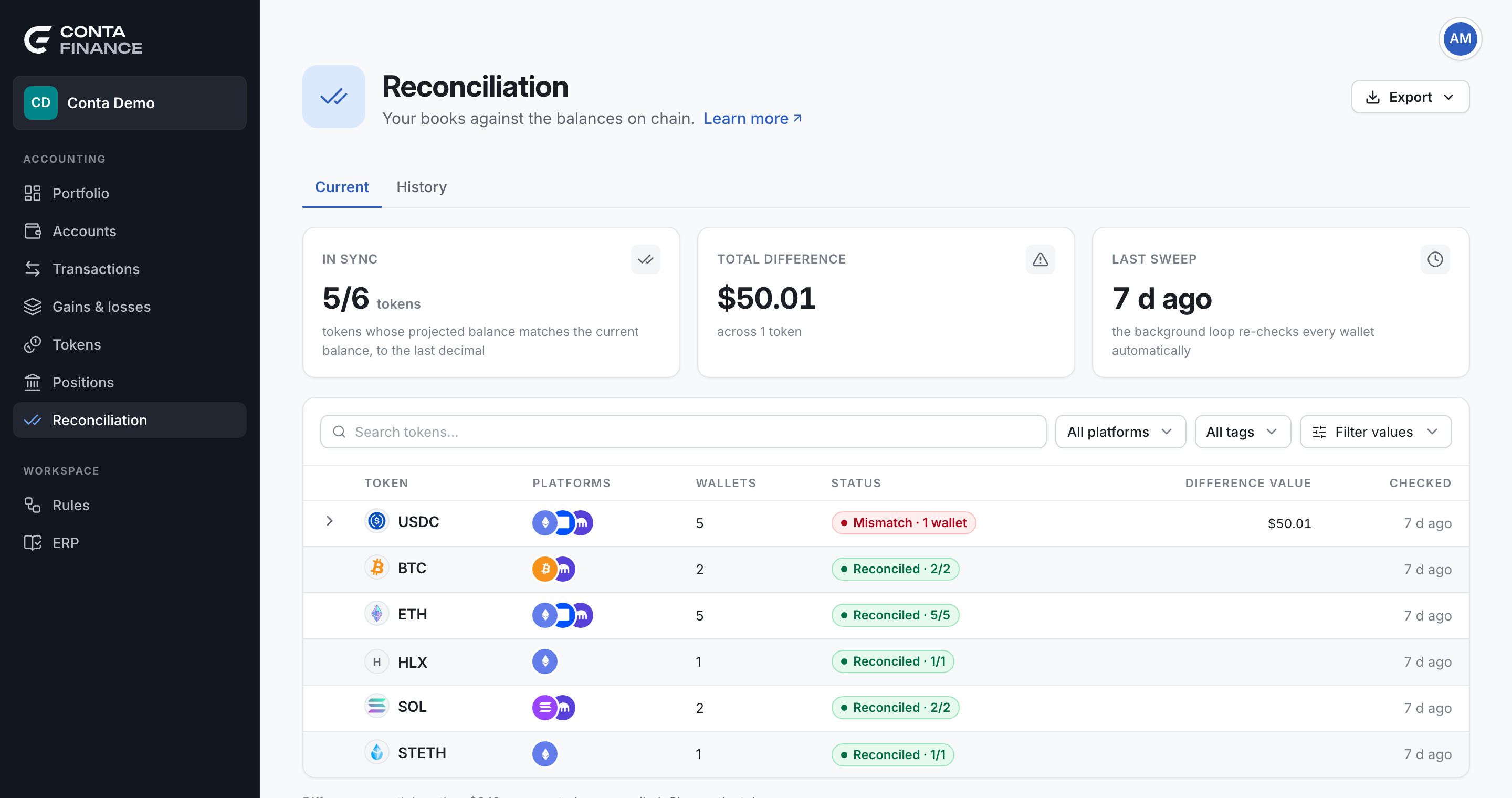
The summary cards
| Card | What it shows |
|---|---|
| In sync | The tokens whose projected balance matches the current balance, out of all the tokens. A token with a rebaseA change in the balance of a token with no transaction: the token grows on its own. Reconciliation expects the difference. difference does not count as in sync. |
| Total difference | The value of every difference, at the current price. Each difference counts as a positive amount, so a balance that is too high does not cancel one that is too low. |
| Last sweep | When the background check last ran. |
The cards always cover the whole organization. The filters of the list do not change them.
Total difference starts with ≥ when a difference has no price. The figure is then a minimum. Its caption names the part that comes from expected rebases, and the number of differences pending verification, which are not counted.
Not reconciled yet
If some accounts have no result yet, the caption of In sync says how many: for example, 2 accounts not reconciled yet. Point at it to see their names and their platforms. A new account usually gets its first result on the next check.
The list of tokens
The list has one row per token, across all its platforms.
| Column | Meaning |
|---|---|
| Token | The token. |
| Platforms | The platforms where your accounts hold it. Point at a mark to see its name. |
| Wallets | How many accounts hold it. |
| Status | The worst status among those accounts, and how many accounts have it. |
| Difference value | The value of the differences of the token, at the current price. |
| Checked | When the token was last checked. |
Select a row with a difference to see each account that differs, with its Projected and Current balance, and the Delta. The delta is the current balance minus the projected balance. A positive delta means the books miss an amount that came in.
Each account row offers two actions:
- Review transactions opens Transactions, filtered to that account and that token.
- Adjust balance records a correction. See Fix a balance mismatch.
Filters
- Search finds a token by its name.
- All platforms limits the list to some platforms.
- Tags limits the list to the accounts with some tags.
- The value filter hides the tokens whose difference is outside a range. A token with a difference that has no price always shows.
The tolerance
A difference worth less than the reconciliation tolerance of the organization counts as reconciled. It is usually rounding, far below one cent. The note under the list gives the amount, for example Differences worth less than $0.10 are reported as reconciled.
To change it, select Change the tolerance. The tolerance is in USD, between $0 and $1. At $0, every difference shows and the note is hidden. A new tolerance applies on the next check. A difference that has no price is never hidden by the tolerance.
Statuses
| Status | Meaning |
|---|---|
| Reconciled | The two balances match, or the difference is under the tolerance. |
| Pending verification | A new difference. It often means that recent activity is not imported yet. Conta Finance checks again, and the difference counts as a mismatch only if it stays. |
| Mismatch | A difference that stayed. It needs an explanation. |
| Rebase difference | The token grows on its own with no transaction, such as stETH. A difference is expected. |
The History tab
The History tab keeps one snapshot per day. Conta Finance records it after 00:00 UTC, for the day that just ended. A recorded day never changes: a correction shows in the snapshot of a later day. Each snapshot keeps the names of the accounts and the prices of that day.
The history cards
| Card | What it shows |
|---|---|
| Days over $10 | The days in the range whose differences add up to more than 10 in the currency of the organization. The label shows the symbol of that currency. |
| Snapshots recorded | The days with a snapshot, out of the days in the range. A day with no snapshot has no record. |
| Worst day | The day with the largest difference value, and how many accounts were in sync that day. |
The list of days
The list opens on the last 30 days. Change the range with the date field. Each row shows the Day, its Status (All reconciled when nothing differs), the Wallets in sync, the Difference value at the prices of that day, and when it was Recorded.
Select a day to see each difference of that day. The History tab is read-only: you cannot adjust a balance from it.
Export
Export in the header writes the open tab, with its filters, as Excel or CSV. The Current tab writes the tokens and every difference. The History tab writes the days and every difference, at the prices of each day.