Fix a balance mismatch
Find why the balance in your books differs from the balance on the platform, and correct it.
Where to find it:your-organization.conta.financeReconciliation
A mismatchA difference between the balance in your books and the balance on the platform, larger than the tolerance. means that the sum of the movements of an account is not what the blockchain or the exchange holds. Find the cause before you correct the balance.
Before you start
- Wait if the status is Pending verification. A new difference often goes away when recent activity is imported.
- A Rebase difference is expected. The token grows with no transaction, such as stETH. Correct it only when the amount matters for your books.
Read the difference
- Open Reconciliation in the sidebar.
- Select the row of the token with the Mismatch status.
- Read the Delta of each account. It is the Current balance minus the Projected balance.
- A positive delta means the platform holds more than your books. A movement in is missing.
- A negative delta means the platform holds less. A movement out is missing, often a fee.
Look for missing transactions
- Select Review transactions on the account row. Transactions opens, filtered to that account and that token.
- Compare the movements with the history on the blockchain explorer or the exchange.
- If a transaction is missing, open the account page and select Rescan history. It reads the history again on every platform of the account.
The page then says how many movements it recovered. If the transaction is still missing, add it by hand. See Add a transaction.
Known causes that no transaction records
Some balance changes happen with no transaction, or the data source does not give them. Most of them show as a mismatch.
| Platform | Known causes |
|---|---|
| Ethereum | stETH held before 16 May 2023: its growth before that day is not recorded. It shows as a Rebase difference. |
| Monad | Proposer fees are written when each UTC hour ends, so the current hour differs. |
| Solana | The accounts of a validator receive rewards and commission with no transaction. Before epoch 560, and during the epoch in progress, they show a difference. |
| Cosmos blockchains | Slashing of a validator. Coins received at the launch of the blockchainCoins a Cosmos blockchain gave to an account on its first day, with no transaction.: use Genesis balance on the account page. History older than the data source. Fees of transactions a validator signs. Osmosis pool lockups and epoch rewards. Refunds of governance deposits. |
| Bitcoin | Coins paid to an address of an HD wallet beyond 20 unused addresses. A transaction the data source left out: Rescan history can recover it. |
| Exchanges | KuCoin entries that the exchange does not give. A token the exchange renamed. Amounts far below one cent, from rounding. Bit2Me Earn rewards with no movement. History that Binance has no list for, or no longer gives. |
If none of these explains the difference, write to [email protected].
Adjust the balance
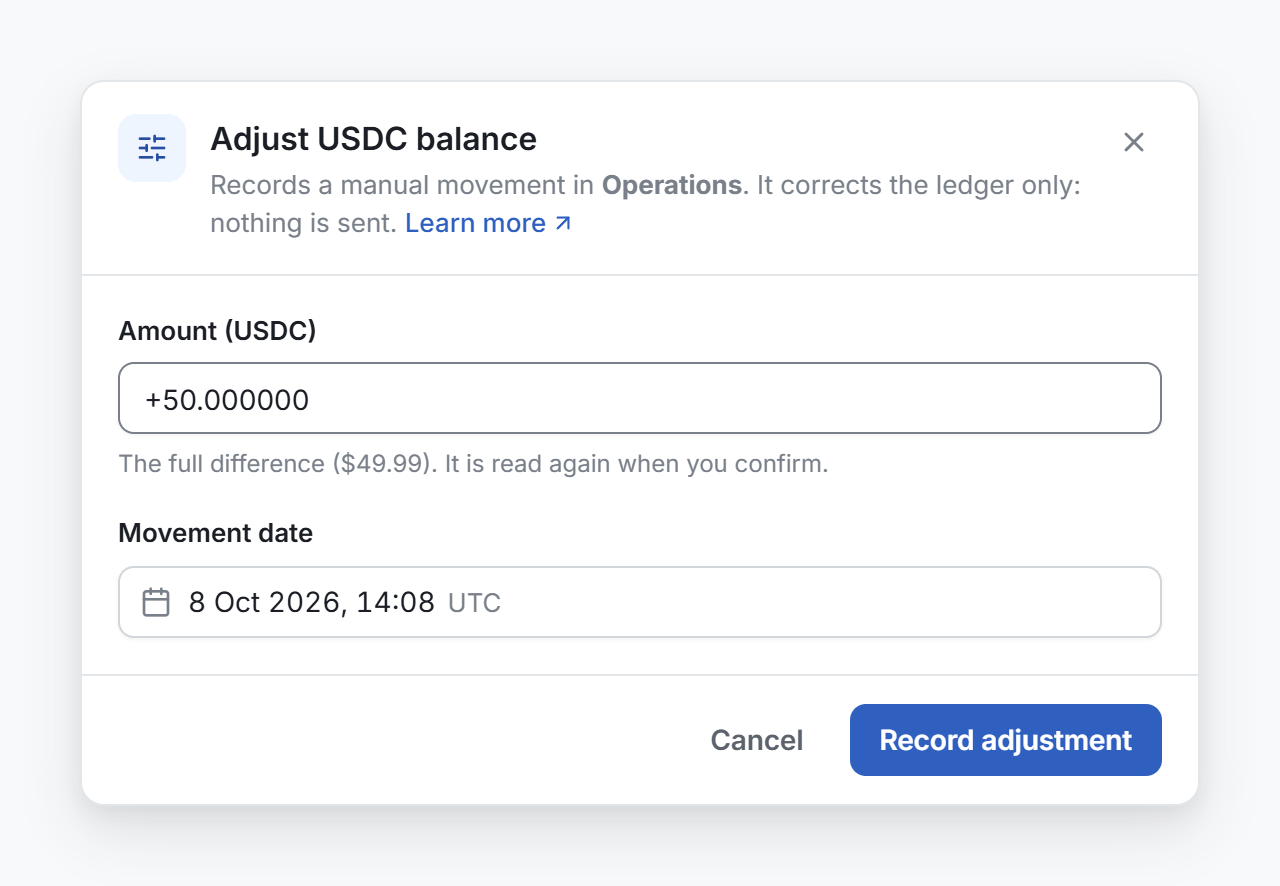
When you know the cause, record a correction. It is a manual movement in your books. Nothing is sent to the blockchain or the exchange.
- On the account row, select Adjust balance.
- Check the amount, in the field Amount followed by the ticker. It opens on the full difference. If you leave it, Conta Finance reads the balance again when you confirm, and corrects the exact difference at that moment. You can type another amount, with a minus sign for an amount out.
- In Movement date, pick the moment of the correction, in UTC. The date decides the period and the fiscal yearThe twelve months your books close on. You set its first day in Organization settings. where it counts. It cannot be in the future.
- Select Record adjustment.
The row then says Adjusted · updates next sweep. The status changes after the next check.
Some causes come back, such as validator rewards. Adjust again when the difference grows enough to matter.
Delete an adjustment
An adjustment is a transaction you entered by hand, so you can delete it.
- Open the adjustment in Transactions. Review transactions on the Reconciliation page finds it.
- Select its movement.
- Select Delete in the selection bar, then confirm.
The difference comes back on the next check.
Differences too small to fix
A difference worth less than the reconciliation toleranceThe amount in USD under which a balance difference counts as reconciled. The default is $0.10. counts as reconciled. The note under the list on the Reconciliation page gives the amount. Select Change the tolerance to change it. See The Reconciliation page.