Connect an exchange
Connect a Kraken, KuCoin, Bit2Me, Bitvavo or Binance account with a read-only API key, so Conta Finance imports its history.
Where to find it:your-organization.conta.financeAccountsNew accountExchange
An exchangeA company that holds assets for you, such as Kraken or KuCoin. Conta Finance reads it with a read-only key. account is an accountA wallet or an exchange account your organization controls. that Conta Finance reads through an API key. Conta Finance only reads. It never trades, moves or withdraws funds.
Supported exchanges
| Exchange | Fields to fill |
|---|---|
| Kraken | API key, Private key |
| KuCoin | API key, API secret, API passphrase |
| Bit2Me | API key, API secret |
| Bitvavo | API key, API secret |
| Binance | API key, Secret key |
For another exchange, write to [email protected].
Create a read-only key
Create the key on the website of the exchange before you start. Give it read permissions only.
- Kraken: open Settings, then API. Tick only Query under Funds and Query ledger entries under Data. Do not set a query start or end date. Conta Finance refuses a key with a permission it does not need, or with those dates.
- KuCoin: create a key with the General permission only. Conta Finance refuses a key that can trade, transfer or withdraw.
- Bit2Me: create the key with the Read scope only. Bit2Me does not let Conta Finance check the scopes of a key, so it cannot refuse a key that can trade. Make sure yours is read-only.
- Bitvavo: on the website of Bitvavo, select your name, then Settings, then API. Create the key with only View access switched on. Leave the IP whitelist empty, because Conta Finance does not call from a fixed address. Bitvavo does not let Conta Finance check the permissions of a key, so it cannot refuse a key that can trade or withdraw. Make sure yours is read-only. The account must have one transaction or more, for example a deposit: Conta Finance identifies a Bitvavo account by its first transaction.
- Binance: open Account, then API Management, and create a key. When Binance asks for the type of the key, choose System generated. Leave only Enable Reading ticked. Do not restrict the key to trusted IP addresses, because Conta Finance does not call from a fixed address. Conta Finance refuses a key with another permission.
Connect the account
- Open Accounts in the sidebar and select New account.
- Select Exchange, then the exchange.
- In Account name, type the name your team uses for the account.
- Keep Read-only API key selected. Upload of a file is not available yet.
- Paste each key field.
- Select Connect … with the name of the exchange.
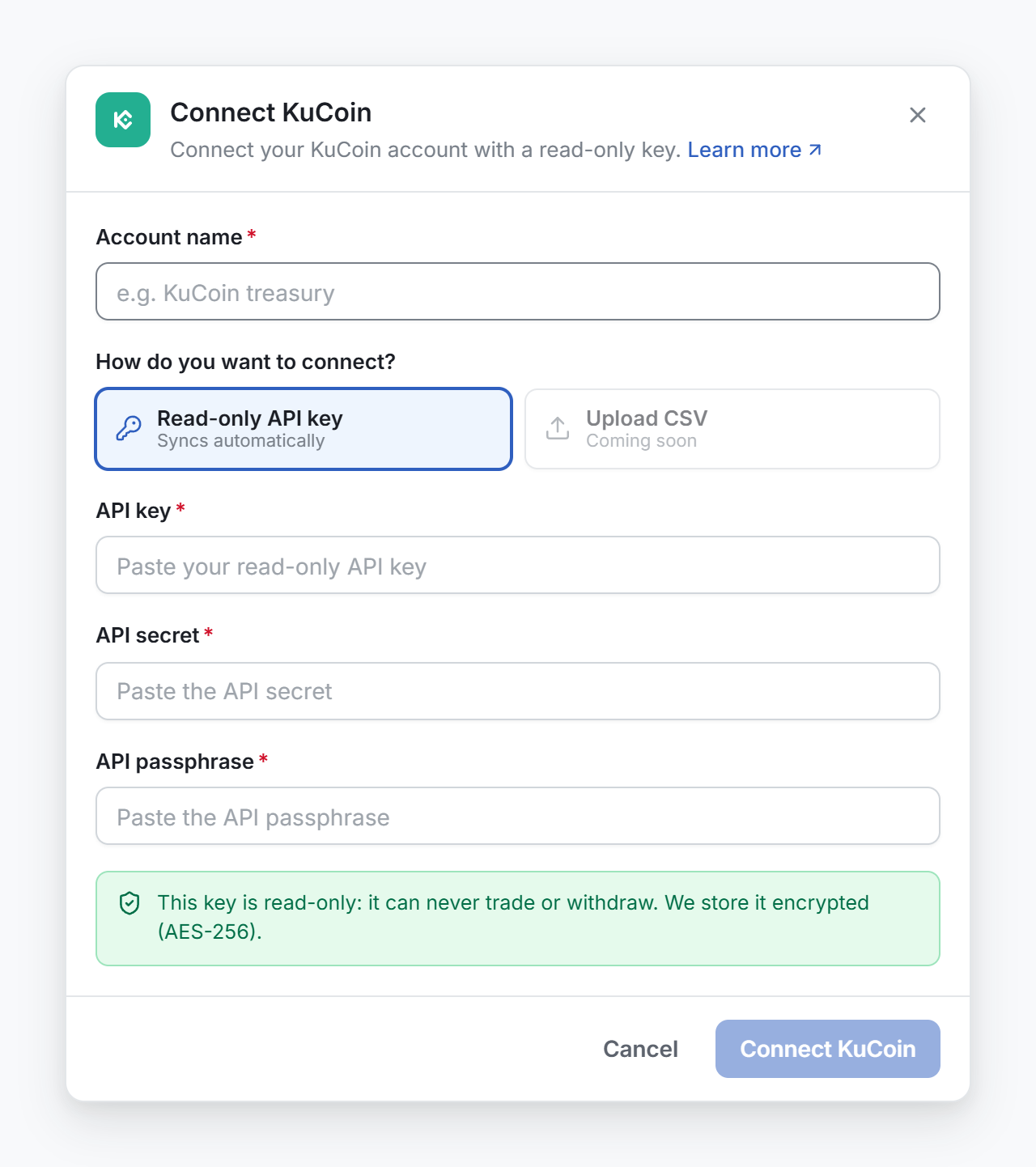
Conta Finance checks the key before it saves it. If the key is not valid or has too many permissions, the window shows why. Nothing is saved.
Check the account
When the key is valid, the window shows what the exchange reports:
- Account: the identifier of your account at the exchange.
- Key: the label of the key, when the exchange gives one.
- Access: the permissions of the key. For Bit2Me and Bitvavo it says that the exchange does not report them.
- Balances the exchange reports: each currency and its amount.
A Kraken key can also show a warning, for example when the key expires or accepts only some IP addresses. The key works now, but it stops working at that moment.
Check that this is the account you meant, then select Done.
What Conta Finance reads
The import of the full history starts at once and runs in the background. It reads the ledger of the account: deposits, withdrawals, trades, conversions and Earn rewards. Each operation becomes a transactionOne on-chain transaction or one exchange operation. It holds one or more movements. on the platform of the exchange.
- KuCoin: the main, the trading and the futures accounts. Each settlement of a futures contract is one transaction with the method
Futures PnL. KuCoin settles every 8 hours and reports the result of the period as one amount, with the trading fees and the funding inside it. Margin is not read. - Bit2Me: the wallet, Bit2Me Pro and Earn balances.
- Kraken: the ledger of the spot account. Kraken Futures is not read.
- Bitvavo: the transaction history of the account, with its staking rewards. The balance includes what open orders hold and what is locked in fixed staking.
- Binance: deposits, withdrawals, bank deposits and withdrawals, spot trades, Convert, conversions of small balances and distributions. The balance is the sum of the Spot, Funding and Simple Earn wallets. The first import takes about 20 minutes. Binance has no single history, and Conta Finance does not read every product: see What Conta Finance reads from Binance.
The key is stored encrypted. No page of the app shows it again, except its last four characters.
Replace a key
To replace the key of an account, connect it again with the new key. Conta Finance recognizes the account, replaces the stored key and keeps the history. The window then says that the key was updated.
Stop tracking an exchange account
- On the Accounts page, open the menu at the end of the row.
- Select Delete account.
- Type the name of the account to confirm, then select Delete account.
Conta Finance also deletes the stored key. Its history stays in the ledger. To make sure the key can never be used again, also delete it on the website of the exchange.