Fix a token with no price
Find the movements that have no value, and give their token a price, another token, a leader or the ignored mark.
Where to find it:your-organization.conta.financeTokens
Each movementOne asset going into or out of one of your accounts. A transaction has one movement per account and asset. takes its value from the price of its token at that moment. When there is no price, the movement has no value, and the cost basis of the token is not complete.
Why a token has no price
- The price sources do not know the token. This is common for small tokens, receipt tokensA token a protocol gives you for a deposit. It stands for the assets inside the protocol. of DeFi protocols and spam.
- The token is not in the catalog of tokens yet. In Transactions, select the token of the movement. If the token is not in the catalog, a menu offers Add token. Add the token before you add a price. See Add a token.
- The USD price exists, but the EUR or GBP rate of that day is missing.
Find the movements with no value
- Transactions: open the Unpriced tab. A warning icon next to the value of a transaction opens Missing price data, which lists each movement and what it is missing.
- Tokens: the line under the title counts the tokens with no price. A price more than one day oldA latest price that is more than one day old. Conta Finance does not use it as the current price. does not count as current. The list opens with Held only ticked, so it shows only the tokens your accounts hold now.
- Gains & losses: the Needs attention tab marks the token Unpriced. See Fix what needs attention.
Choose the fix
| The token is | Do this |
|---|---|
| The same coin as a token with a price, such as a bridged USDC | Add it to that tokenOne coin, such as USDC, with each platform it lives on, such as Ethereum and Base. Its platforms share one price, one symbol and one name.. |
| Worth the same as another token, such as a staking receipt of ETH | Make it follow the other token. |
| Worth something, but no source knows it | Add a price by hand. |
| Spam or dust | Ignore it. |
Add the token to another token
A token is one coin across platforms. Its platforms share one price, symbol and name.
- Open Tokens in the sidebar.
- In the row of the token, open the menu in the Actions column and select Add to a token.
- In Token, pick the token.
- Select Assign.
Follow another token's price
A follower takes the price of its leader. It keeps its own balances and its own cost basis.
- On the Tokens page, expand the token.
- Open the menu of the contract and select Follow another token.
- In Leader token, select the token to follow.
- Select Follow.
The current price changes at once. Past values change on the next recalculation. A token that follows another cannot be a leader. To stop, select Unfollow … in the same menu.
Add a price by hand
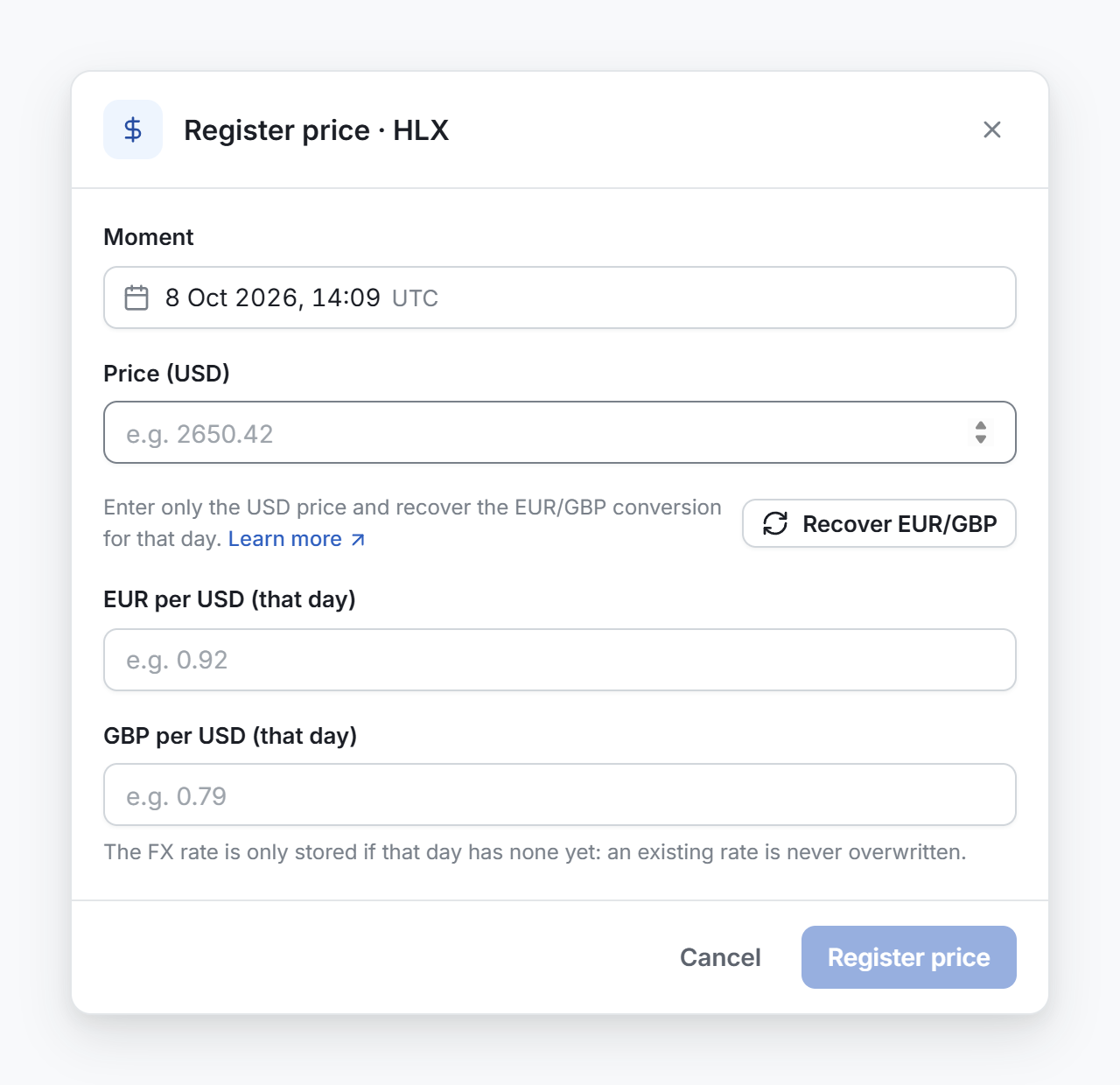
A price you add fills the movements of that token in the same hour (UTC). Add one price for each moment that needs one.
Open the price window from one of these places:
- In Missing price data, select Add price on a movement. The moment is filled in.
- In Transactions, select one movement and select Set value in the selection bar. The moment is filled in.
- On the page of the token, select Add price, or Manage > Add a price manually.
- Check Moment. It is in UTC and cannot be in the future.
- In Price (USD), type the price of one token.
- Select Recover EUR/GBP to fill the rates of that day. If the rates cannot be found, type them in EUR per USD (that day) and GBP per USD (that day).
- Select Register price.
Ignore a token
Ignore a token that has no value for you, such as a spam airdrop.
- On the Tokens page, Ignore token in the row menu ignores every contract of the token.
- Ignore contract in the menu of a contract ignores only that contract.
An ignored token leaves the Tokens list, and Conta Finance stops looking for its price. Its history, balances, cost basis and reconciliation do not change. To see it again, tick Show ignored and select Unignore token.