Fix what needs attention
Find the tokens whose gains and losses figures are not complete, and correct each one before you close a period.
Where to find it:your-organization.conta.financeGains & lossesNeeds attention
The Needs attention tab of the Gains & losses page is a list of tasks. Each row is one token with one problem that makes its figures incomplete. Fix every row before you close a period.
Open the list
- Open Gains & losses in the sidebar.
- Select the Needs attention tab. The number on the tab is the number of rows.
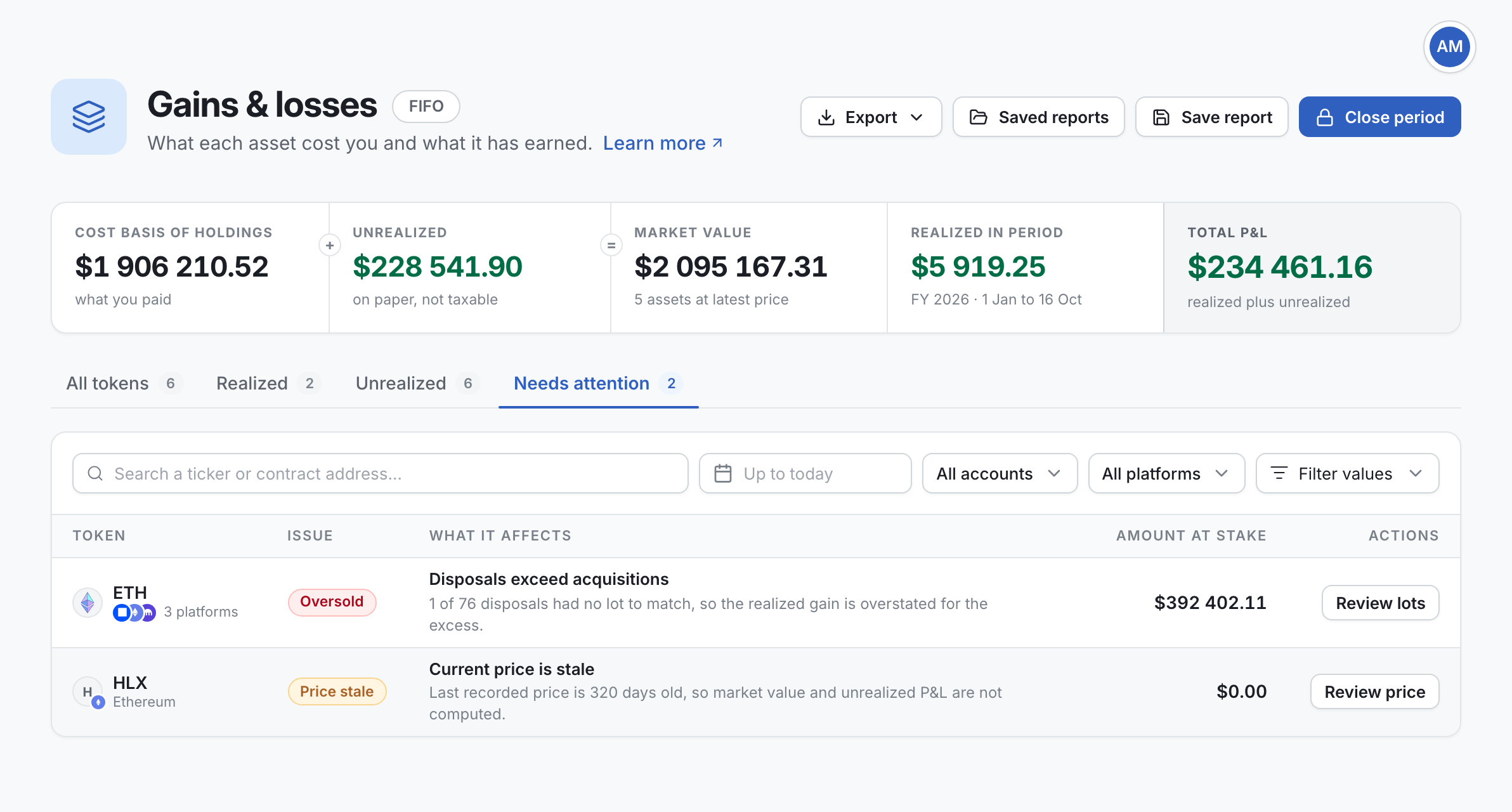
Each row shows:
| Column | Meaning |
|---|---|
| Token | The token with the problem. |
| Issue | The kind of problem: Price stale, Unpriced or Oversold. |
| What it affects | What is wrong, and which figures it makes incomplete. |
| Amount at stake | The money that depends on the problem. It is the value of the position at today's price. If you hold none of the token, it is the proceeds of its sales. |
| Actions | The button that starts the fix. |
The rows with the largest amount at stake come first. One token can have more than one row, one for each kind of problem.
Movements without a price
The Unpriced chip means some movements of the token have no recorded price. The row says how many, for example "3 of 40 movements had no recorded price". Conta Finance cannot compute the cost basisWhat you paid for the assets you hold or disposed of. of the token without them.
- Select Add prices. The Unpriced movements window opens, with each movement that has no price.
- On a movement, select Add price. The Moment of the movement is already filled in, in UTC.
- In Price (USD), type the price of one token at that moment.
- Select Recover EUR/GBP to fill in the exchange rates of that day, or type them.
- Select Register price, then Done.
The movement leaves the list. Do the same for each movement. When the list is empty, the row leaves the Needs attention tab.
A current price that is stale
The Price stale chip means the latest recorded price of the token is more than one day old. Conta Finance does not use an old price as the current price. So the market value and the unrealizedThe gain or loss on what you still hold: market value minus cost basis. It is on paper only. P&L of the token are not computed. The realizedThe gain or loss fixed by a disposal: what you received minus the cost of the lots it consumed. figures are not affected.
- Select Review price. The report of the token opens.
- Read the age of the latest price in the banner at the top.
- If the token still has a market, wait for the next price. If it has none, add a price by hand. See Fix a token with no price.
Disposals exceed acquisitions
The Oversold chip means the token left your accounts in larger amounts than it came in. Some disposalsAn asset leaving your portfolio, by a sale, a swap or a payment. It consumes lots. had no acquisition lotOne acquisition of an asset: how much came in, when, and at what cost. to match. So the realized gain is too high for the excess.
This problem is about the whole history of the token, not only the current period. It usually means an acquisition is missing from the ledger.
- Select Review lots. The report of the token opens.
- On the Disposals tab, find the disposals with no date in Lot consumed. The tab shows the disposals of one fiscal year. If you find none, pick an earlier as-of date.
- Open the Acquisition lots tab and look for the purchase or transfer that should come before it.
- Add what is missing. For example, add the account the token came from, add the transaction, or import a ledger with the older history.
When the acquisitions cover every disposal, the row leaves the list.
When the list is empty
The tab shows "Every token has complete figures. Nothing to fix before you close the period." You can now save a report and close the period.