Tokens on several platforms
How one coin on many platforms becomes one token with one price, and how to add a token to another, edit a token or ignore what you do not need.
Where to find it:your-organization.conta.financeTokens
The same coin often lives on many platformsWhere an asset lives: a blockchain or an exchange.: USDC on Ethereum, on Base, on Solana and on an exchange. Each one is a different contract. Conta Finance keeps them in one token, so the coin has one price, one symbol and one name.
What a token is
A token is one coin, such as USDC. When it matches a known coin, its identifier is the CoinGecko id of the coin, such as usd-coin.
- Each platform of the token has its own contract. Every platform reads the same price.
- Each platform keeps its own balances. Your accounts still hold USDC on Ethereum and USDC on Base apart.
- The Gains & losses page reports one position per coin, not per contract. See The Gains & losses page.
Conta Finance matches each new token to a coin by itself. It reads the contract address on its platform. A native coinThe coin a blockchain pays its fees in, such as ETH on Ethereum. It has no contract address., such as ETH on Ethereum, matches the coin of its blockchain. A token on an exchange matches the coin with the exact same symbol.
A token that matches a coin is linked. A token that matches no coin is unlinked. It is priced on its own contract, and it shares no price with anything. The Tokens page lists the unlinked tokens last.
If CoinGecko stops naming a contract, or delists a coin, the contract stays in its token and keeps its price history. Only you take a platform out.
The primary platform
When you add a token by hand with Add token, you list its platforms. The first platform is the primary. Only the primary is priced, and every other platform shares its price. With several platforms, the form marks it with a star.
Put first the platform whose price you trust most. You can change it later in Edit token: select the star on another platform. When the primary changes, the price history moves with it. A token matched to a coin has no primary: every platform takes the price of the coin.
Add a token to another token
Do this when an unlinked token is the same coin as another token, but did not match by itself. A bridged USDC on a Cosmos chain is a common case.
- Open Tokens in the sidebar.
- In the row of the unlinked token, open the menu in the Actions column and select Add to a token.
- In Token, pick the token.
- Select Assign.
The token becomes a platform of the chosen token and takes its price, symbol and name.
Edit a token
Do this to rename a token, to add a platform to it, to take one out, or to change the primary.
- In the row of the token, open the menu in the Actions column and select Edit token. On the page of the token, use Manage > Edit token.
- To rename it, change Name. For a token matched to a coin, leave it blank to use the name of CoinGecko.
- To add a platform, select Add platform. Pick the blockchain and type the address.
- To take a platform out, select the cross on its row.
- For a token with no coin, select the star on a platform to make it the primary.
- If the balance of the token grows with no transfer, such as an Aave aToken, open Advanced options and select Its balance grows with no transfer (rebase). Each day, Conta Finance compares the balance on the blockchain with the one in the ledger and books the difference as rebase income. It starts the day you mark it: the first day takes what the token grew before. It is only offered for a token on an EVM blockchain. For stETH it is set and cannot be changed: Conta Finance reads its rebase by itself.
- Select Save.
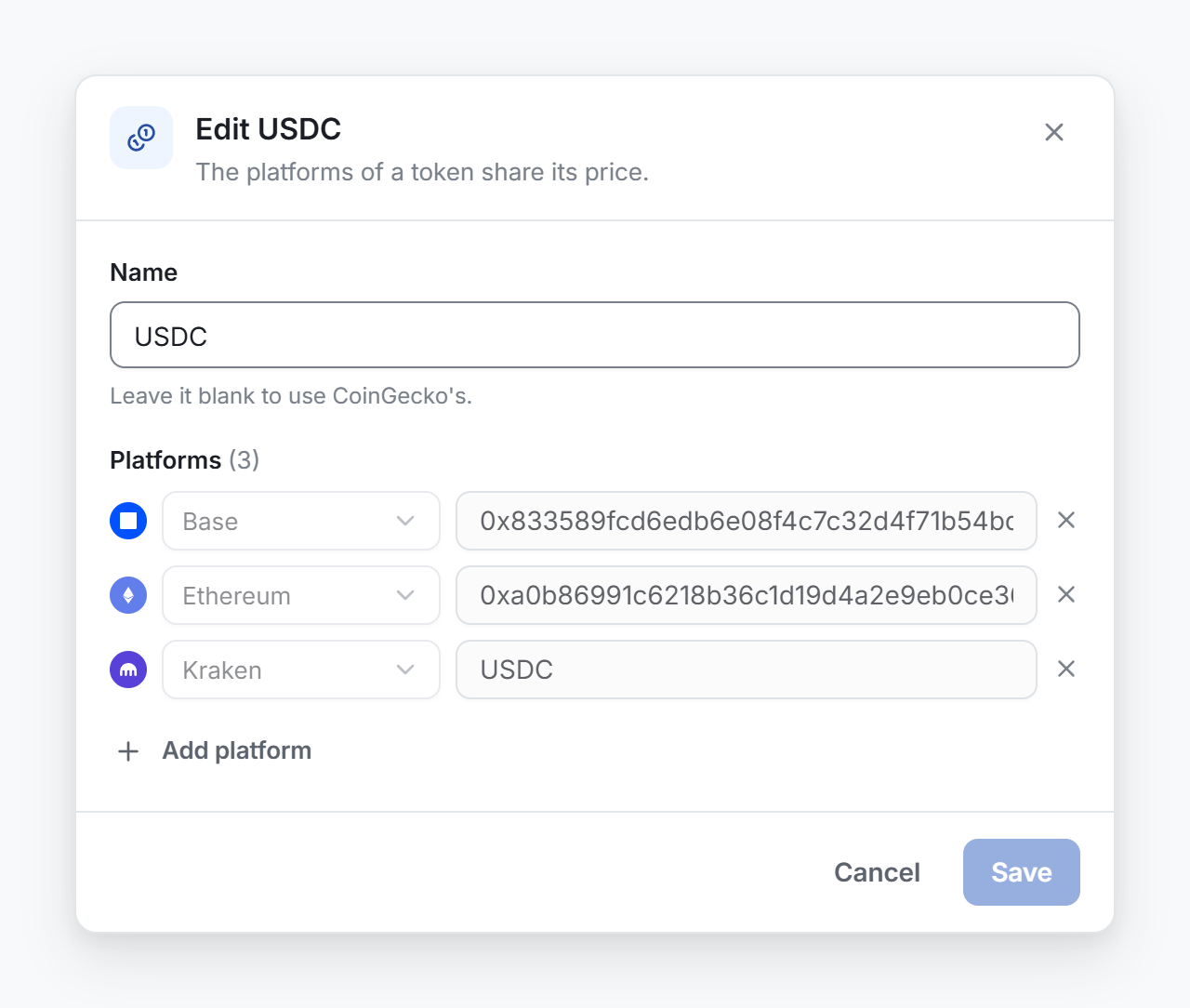
The name shows everywhere the token does, and the daily sync keeps it. Nothing changes until you save. Cancel leaves the token as it was. A platform you take out stays in the catalog as a token of its own, with a copy of the price history up to then, so its past movements keep their prices. To undo it, add it again. If the platform matched the coin by itself, the daily sync of the coin catalog adds it back.
Follow another token instead
Some tokens are worth the same as another coin, but are not the same coin. A staking receipt of ETH is an example. Do not add it to ETH. Make it follow ETH instead.
| Add to a token | Follow | |
|---|---|---|
| Shares the price | Yes | Yes |
| Shares the symbol and the name | Yes | No |
| Shares the cost basis | Yes: one position per coin | No: it keeps its own |
| Acts on | The whole token | One contract |
A token that follows another cannot be followed in turn. For the steps, see Fix a token with no price.
Ignore a token or a contract
Ignore what has no value for you, such as a spam airdrop. Conta Finance then stops looking for its price.
- Ignore token, in the menu of the token, ignores every contract of the token.
- Ignore contract, in the menu of a contract, ignores that contract only. The other contracts of the token stay.
Ignore a contract when only one contract of the token has no value for you. Ignore the token when the whole token is spam. Ignoring changes no history, no balance and no cost basis. See Fix a token with no price.