The page of a token
One screen for one token across every platform, with its holders, its price history, its identity and its contracts.
Where to find it:your-organization.conta.financeTokensa token
The page of a token shows one token across every platformWhere an asset lives: a blockchain or an exchange. it lives on. It answers first who holds the token, then what it is worth and which contracts it has. To open it, select a row on the Tokens page, or select a token anywhere in the app.
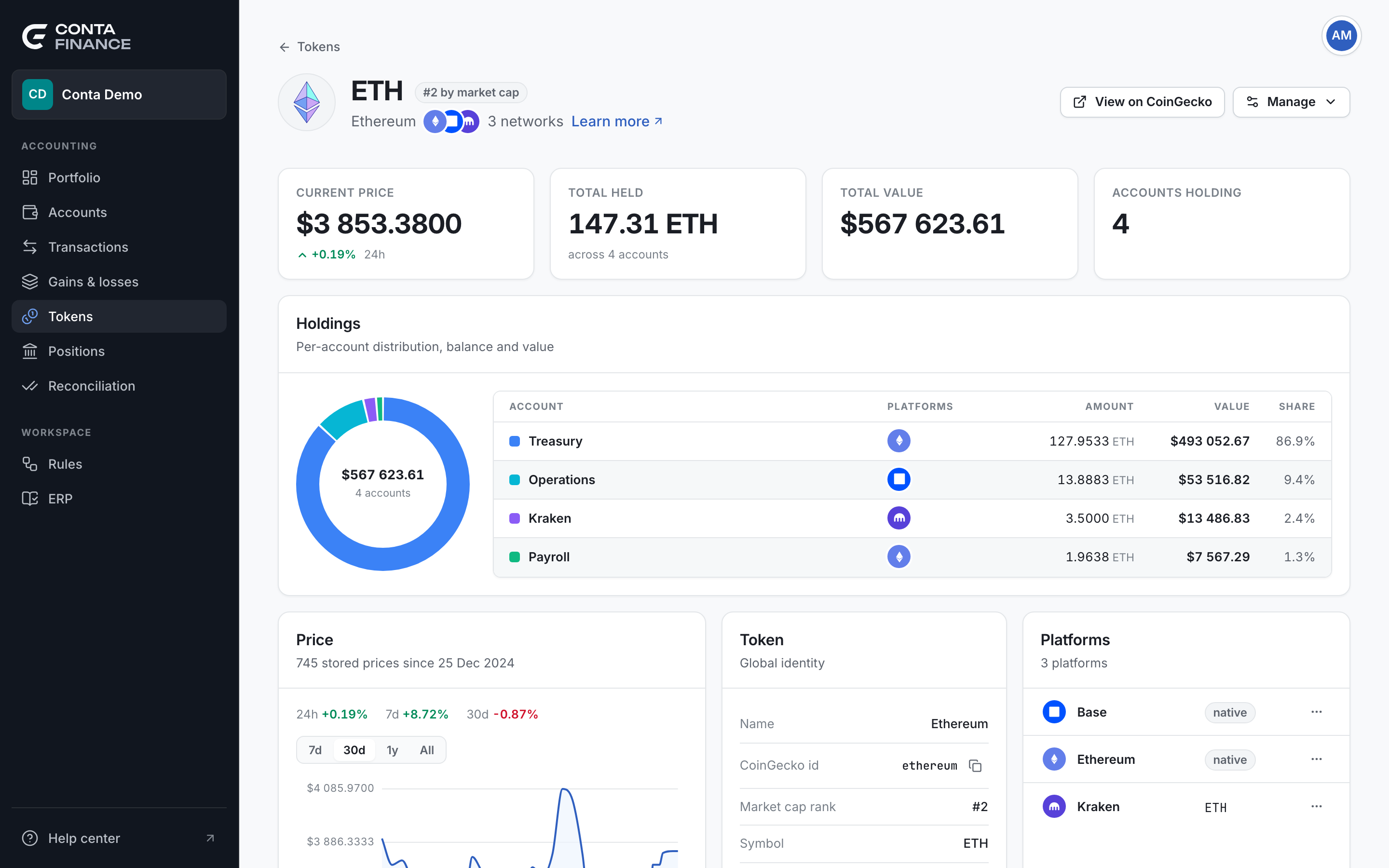
The header
The header shows the mark and the symbol of the token, its name, the platforms it lives on and how many. Tokens at the top goes back to the list.
A badge follows the symbol:
- The rank by market cap, such as "#2 by market cap", when the token is matched to a known coin.
- unlinked when it is not. The token then has no shared price.
The header actions
| Action | When it shows | What it does |
|---|---|---|
| View on CoinGecko | The token is linked. | Opens the page of the coin in a new tab. |
| Add price | The token is unlinked. | Opens the window to add a price by hand. |
| Manage | Always. | Opens the menu below. |
The Manage menu:
| Item | What it does |
|---|---|
| Edit token | Renames the token, adds or removes its platforms, or changes its primary. |
| Add to a token | Makes an unlinked token a platform of another token. After you add it, the page goes back to the Tokens list. |
| Add a price manually | Opens the window to add a price by hand. |
| Ignore token | Ignores every contract of the token. Unignore token reverses it. |
To add a price by hand, see Fix a token with no price. For tokens on several platforms, see Tokens on several platforms.
The four figures
| Card | What it shows |
|---|---|
| Current price | The price of one token now, in your reporting currencyThe currency of every balance, valuation and report: USD, EUR or GBP. You choose it in Organization settings., and its change over 24 hours. It shows a dash when there is no current price. |
| Total held | The amount your accounts hold, and across how many accounts. |
| Total value | The value of that amount. |
| Accounts holding | The number of accounts that hold the token. |
A price more than one day oldA latest price that is more than one day old. Conta Finance does not use it as the current price. is not a current price. See Prices and exchange rates.
Holdings
The Holdings card shows who holds the token, as a donut and a list. Each row is an accountA wallet or an exchange account your organization controls., with its Platforms, its Amount, its Value and its Share. The amounts of an account add up across every platform and every contract of the token.
When the token has no price, the donut splits the amount instead of the value.
Price
The Price card draws the price history of the token. The subtitle says how many prices are stored and since when.
- Above the chart, 24h, 7d and 30d show the change of the price over each span.
- The buttons 7d, 30d, 1y and All choose the range of the chart. The chart opens on 30d, or on All when there is less than 30 days of history.
- A range longer than the stored history is greyed out. Its tooltip says how many days of prices there are.
Hold the pointer on the chart to read the price at a moment. Recent prices show at full detail. Older prices show fewer points, so the chart stays readable over years.
Token
The Token card shows the Global identity of the token:
| Row | What it shows |
|---|---|
| Name | The name of the token. |
| CoinGecko id | The identifier of the known coin the token is matched to, with a copy button. A dash when the token is unlinked. |
| Market cap rank | The rank of the coin by market cap. |
| Symbol | The symbol of the token. |
| Price source | Token price when every contract shares one price. Per contract when the token is unlinked. |
An unlinked token also shows a warning in this card.
Platforms
The Platforms card lists the platforms of the token, one row for each contract. The subtitle counts the platforms, such as 3 platforms. A platform can have more than one contract of the same token, for example after a rebrand.
Each row shows the platform, the address, or native for the coin of a blockchain, and these buttons:
- Copy address. Not shown for a native coinThe coin a blockchain pays its fees in, such as ETH on Ethereum. It has no contract address. or an exchange.
- View on explorer, which opens the address in the explorer of the platform.
- Contract actions, which opens the menu of the contract.
The menu of a contract:
| Item | What it does |
|---|---|
| View transactions | Opens the Transactions page filtered to the token. |
| Follow another token | Prices the contract with the price of another token. Unfollow and the symbol stops it. |
| Ignore contract | Ignores only this contract. Unignore contract reverses it. |
When the token is not found
If the page reads Token not found, no account holds the token and the catalog does not monitor it. Select Back to tokens.