The Tokens page
Every token your organization holds or held, with one row per token across platforms, its price, its holders and its contracts.
Where to find it:your-organization.conta.financeTokens
The Tokens page is the catalog of tokens of your organizationOne company with its own books, its own data and its own address.. Each row is one token, whatever the number of platformsWhere an asset lives: a blockchain or an exchange. it lives on: USDC on Ethereum, on Base and on an exchange is one row with one price. To learn how one token covers several platforms, see Tokens on several platforms.
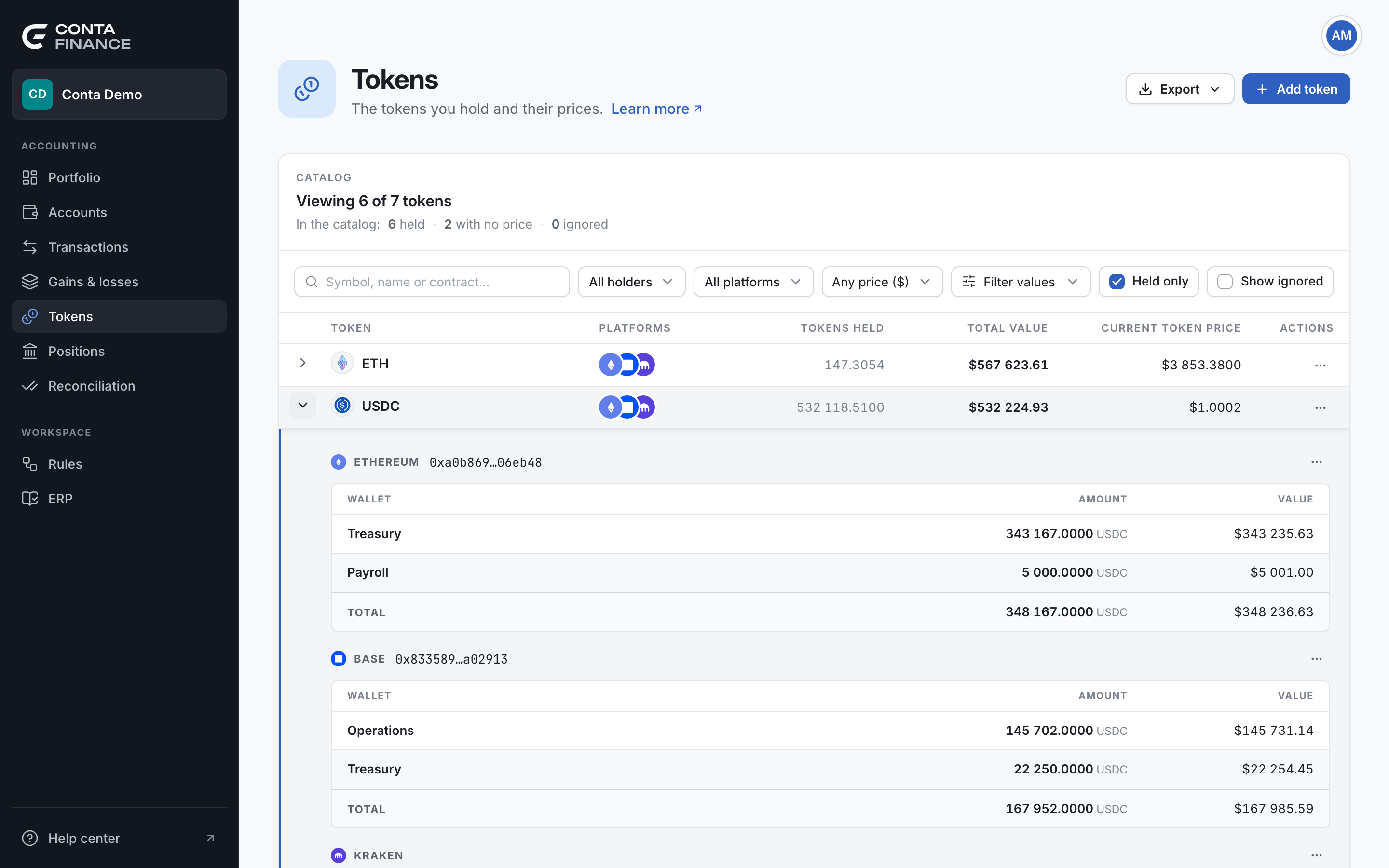
The header
| Action | What it does |
|---|---|
| Export | Writes the catalog as Excel or CSV, with one line for each contract and the key of the token it belongs to, in Token key. |
| Add token | Opens New token, to add a token that is not in the catalog yet. See Add a token. |
The tally
The card title says how many tokens the table shows, out of the whole catalog: for example "Viewing 59 of 136 tokens". A filter changes only the first number.
The line under it, In the catalog:, counts the whole catalog and does not change with the filters:
| Count | What it counts |
|---|---|
| held | The tokens your accounts hold a balance of now. The others are in the catalog from past activity. |
| with no price | The tokens with no current price, so they carry no value. A price more than one day old does not count as current. |
| ignored | The tokens you marked as ignored. |
The three counts overlap: a held token can have no price. So they do not add up to the total.
The filters
The page opens with Held only on and the ignored tokens hidden.
| Filter | What it keeps |
|---|---|
| Search | The tokens whose symbol, name or contract matches. The box reads Symbol, name or contract…. |
| All holders | The tokens held by the accounts you tick. |
| All platforms | The tokens on the platforms you tick. |
| Any price ($) | Choose Price ($) ≥ or Price ($) ≤ and type an amount. A token with no price does not pass. The symbol is the one of your reporting currencyThe currency of every balance, valuation and report: USD, EUR or GBP. You choose it in Organization settings.. |
| Filter values | The tokens whose held value is between a minimum and a maximum. A token with no value always passes. |
| Held only | The tokens your accounts hold now. |
| Show ignored | Adds the ignored tokens back to the list. |
Holders, platforms, Held only and Show ignored apply to each contract. A token shows when at least one of its contracts passes, and its expanded panel lists only those contracts.
The rows
| Column | What it shows |
|---|---|
| Token | The mark and the symbol of the token. |
| Platforms | The platforms it lives on. |
| Tokens held | The amount your accounts hold, across every platform. |
| Total value | The value of that amount, in your reporting currency. |
| Current token price | The current price of one token, or no price yet. |
| Actions | The menu of the token. |
Three badges can follow the symbol:
- ignored: you ignored the token.
rebase: the balance of the token grows with no transfer, and Conta Finance books the growth as income. stETH has it by itself. For another token, set it in Edit token.- unlinked: the token is not linked to another token, so it shares no price with other contracts. The unlinked tokens are listed last, and a warning under the table counts them. To fix one, use Add to a token.
Select a row to open the page of the token.
Expand a token
Select the arrow at the start of a row to expand it. The panel has one section for each platform. When a platform has more than one contract of the token, each contract has its own section, titled with the platform and the symbol of the contract.
The head of a section shows:
- The platform and the contract address, or native for the coin of the blockchain. An exchange has no address.
- ignored when you ignored this contract.
- A link icon when the contract follows the price of another token. Its tooltip reads "Following" and the other token.
- A people icon when other tokens follow this one. Its tooltip reads "Followed by" and their symbols.
- The menu of the contract, at the right end.
Under the head, a table lists the accounts that hold the contract on that platform: Wallet, Amount and Value. It shows the top five holders. When there are more, a last row reads "and" the number "more" and opens the page of the token. When more than one account holds it, a Total line shows the whole holding on that platform.
A section can read "Managed with the token's primary contract, in its own section." That contract shares the price of the primary contract, and its holders and its menu are in the section of the primary.
The menu of a token
Open it from the Actions column. It acts on the whole token.
| Item | What it does |
|---|---|
| View token | Opens the page of the token. |
| Edit token | Renames the token, adds or removes its platforms, or changes its primary. |
| Add to a token | Makes an unlinked token a platform of another token. Only for an unlinked token. |
| Ignore token | Ignores every contract of the token. Unignore token reverses it. |
See Tokens on several platforms for these actions.
The menu of a contract
Open it at the right end of the head of a section. It acts on that one contract.
| Item | What it does |
|---|---|
| View transactions | Opens the Transactions page filtered to the token. |
| Copy contract address | Copies the address. Not shown for a native coinThe coin a blockchain pays its fees in, such as ETH on Ethereum. It has no contract address. or an exchange. |
| Follow another token | Prices the contract with the price of another token. When it already follows one, the item reads Unfollow and the symbol. |
| Ignore contract | Ignores only this contract. Unignore contract reverses it. |
To follow a token, or to choose between ignoring a token and a contract, see Fix a token with no price.