The account page
One account across all its blockchains: its value, where that value sits, its holdings, its transactions and its DeFi positions.
Where to find it:your-organization.conta.financeAccountsan account
The account page shows one accountA wallet or an exchange account your organization controls.. An address tracked on several blockchains is one account, so the page covers all its blockchains together.
To open it, select a row on the Own accounts tab of the Accounts page, or select the name of one of your accounts in Transactions.
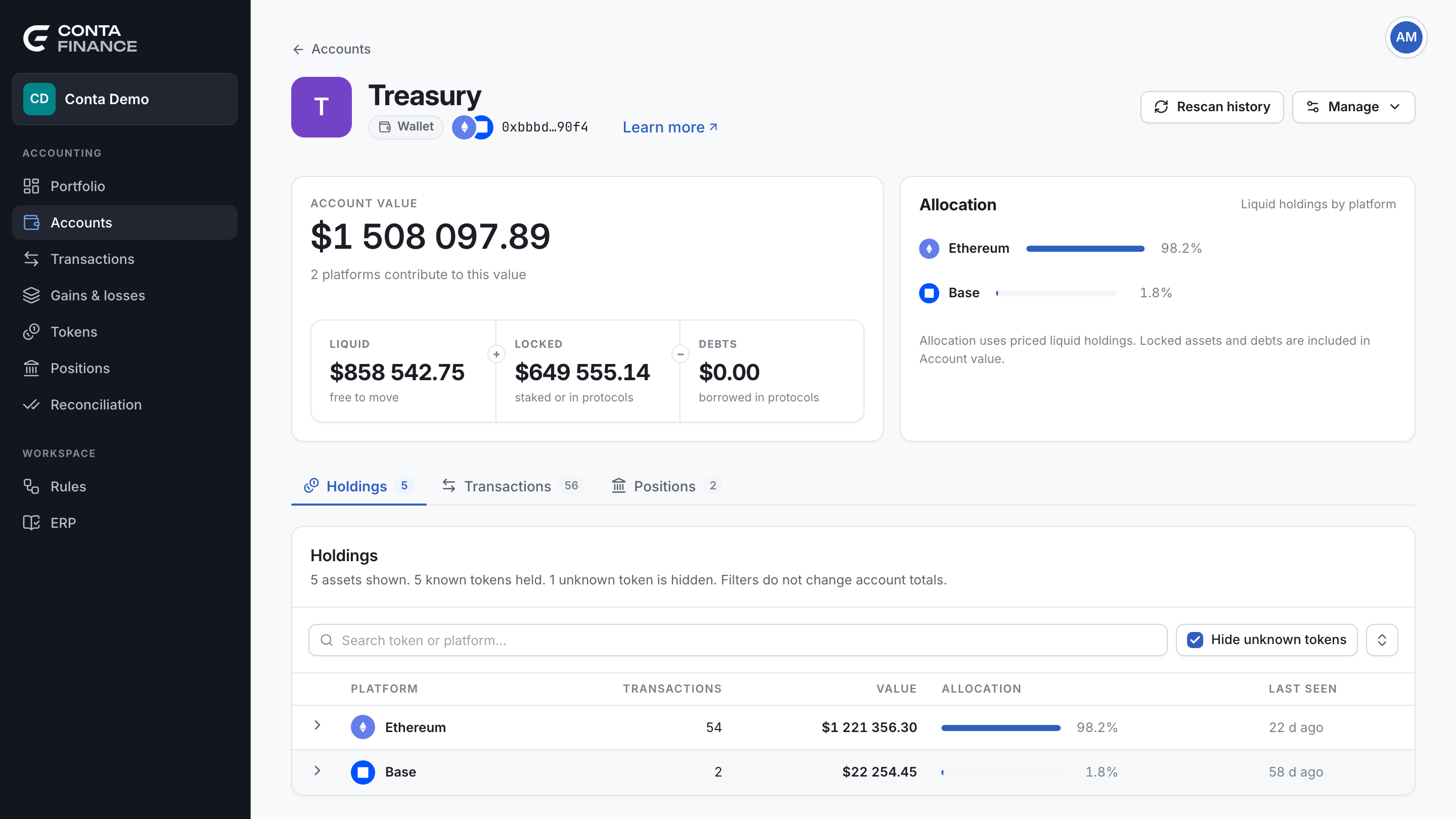
The header
- Back: Accounts above the title goes back to the Accounts page.
- Avatar and name: an account with no name reads Unnamed account.
- Type pill: Wallet, or Exchange account for an exchange.
- Platforms: the marks of the blockchains the account is tracked on.
- Address: the address, with a copy button. An exchange account shows Acct and the account id of the exchange.
The actions
| Action | When it shows | What it does |
|---|---|---|
| Rescan history | Always. | Reads the history of the account again and adds the movements that are missing. See Rescan the history of an account. |
| Genesis balance | The account is on one Cosmos blockchain. | Opens Apply genesis balance. See Cosmos genesis balance. |
| Manage | Always. | A menu with the actions below. |
On the Transactions and Positions tabs, the Export of the tab also shows in the header.
The Manage menu
| Item | What it does |
|---|---|
| Genesis balance · … | One item for each Cosmos blockchain, when the account is on more than one blockchain. |
| Edit account | Opens Edit wallet: the name, the description, the tags and the blockchains. |
| Add transaction | Opens the form to enter a transaction by hand. See Add a transaction. |
| Export as Excel | Downloads the summary and the holdings as an Excel file. |
| Export as CSV | The same, as CSV. |
| Delete account | Stops tracking the account on all its blockchains. You type the name to confirm. The history stays in the ledger. For an exchange account, it also deletes the stored API key. You go back to the Accounts page. |
Account value
The Account value card shows the value of the account in your organization currency. The line under it says how many platforms contribute to the value.
The band under the value shows how the figure is made:
| Cell | Under it | What it holds |
|---|---|---|
| Liquid | free to move | The holdings with a price, minus the part that is also counted in a DeFi position. |
| Locked | staked or in protocols | The assets of the DeFi positions of the account. |
| Debts | borrowed in protocols | What the account borrowed in DeFi protocols. |
Account value is Liquid plus Locked minus Debts. A receipt tokenA token a protocol gives you for a deposit. It stands for the assets inside the protocol. can show both in the holdings and in a positionAn asset your account put to work in a protocol: staked, supplied, added to a pool or locked. It never changes the books.. Conta Finance moves that part from Liquid to Locked, so the value counts it once. See DeFi positions and double counting.
This card only displays. It changes nothing in the portfolio, the ledger, cost basis or reconciliation.
Allocation
The Allocation card shows how the liquid holdings with a price split across platforms. Select a platform to open it in the Holdings tab.
Locked assets and debts are not in the allocation. So its percentages add up to 100 on their own.
The tabs
Each tab shows its count.
Holdings
One row for each platform that holds a positive balance. Select a row to expand it and see its tokens.
| Column | What it shows |
|---|---|
| Platform | The blockchain or the exchange. |
| Transactions | The number of transactions on that platform. |
| Value | The value of the holdings on that platform. |
| Allocation | Its share of the liquid holdings. |
| Last seen | How long ago the latest movement was. |
The expanded rows show Token, Amount, Value and Allocation. Select a column header to sort the tokens. A token with no price shows a dash and sorts last.
The toolbar:
- Search finds a token or a platform.
- Hide unknown tokens is on by default. An unknown token is not in the token catalog. Most of them are spam airdrops. Turn the filter off to see them.
- The button at the right end expands or collapses all platforms.
The line under the title counts the assets on screen and the hidden ones. The filters never change the account totals.
Transactions
The ledger of this account only, across all its platforms. It works as the Transactions page. See The Transactions page.
Positions
The DeFi positions of this account. It works as the Positions page. See The Positions page.