The Accounts page
The accounts your organization controls, the contacts you named, and the addresses you have not named yet, in three tabs.
Where to find it:your-organization.conta.financeAccounts
The Accounts page is the master data of your organization. It lists every accountA wallet or an exchange account your organization controls. you track, every contactAn address you named that belongs to someone else, such as a supplier. you named, and every unidentified addressAn address that sent assets to your accounts or received them, and that you have not named yet. that moved assets with your accounts.
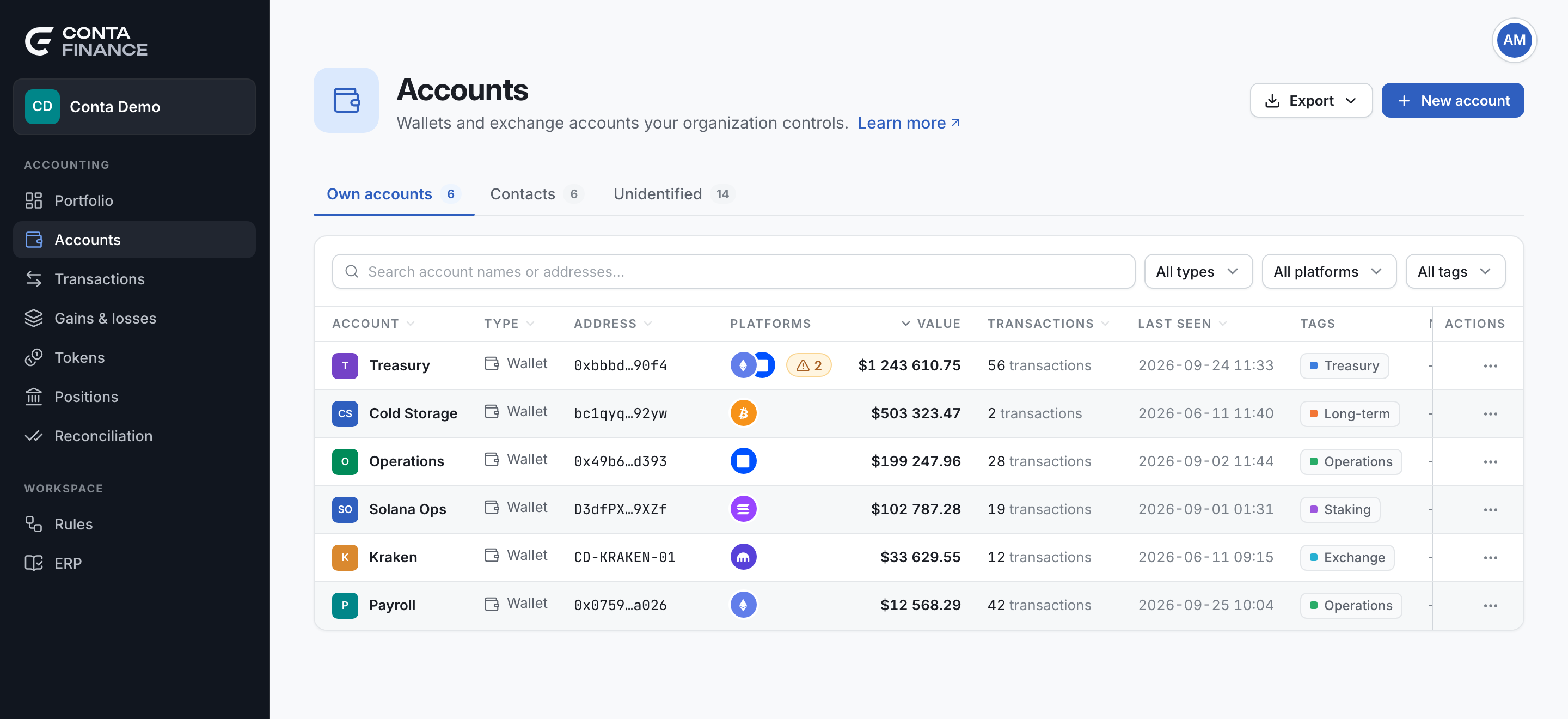
The tabs
Each tab shows its count. The page opens on Own accounts.
| Tab | What it holds |
|---|---|
| Own accounts | The wallets and exchange accounts your organization controls. One row is one address, with all its blockchains. |
| Contacts | Addresses of other people or companies that you gave a name, such as a supplier. |
| Unidentified | Addresses that sent assets to your accounts or received them, and that you have not named yet. |
When you change the tab, the search, the filters and the sort go back to their defaults.
The header
The actions follow the open tab.
| Action | Tab | What it does |
|---|---|---|
| Export | All | Opens a menu with Excel (.xlsx) and CSV. The file holds the rows of the open tab, with the current search, filters and sort. |
| New account | Own accounts | Opens Add account: Wallet, Bulk wallet import or Exchange. See Add a wallet, Import many wallets and Connect an exchange. |
| New contact | Contacts | Opens the New contact form. See Contacts and unidentified addresses. |
The Unidentified tab has no create button. You name an address from its row menu.
The toolbar
The toolbar sits above the table, on every tab.
- Search finds names and addresses. On Unidentified, it finds addresses only.
- All types filters by type: Wallet or Exchange. It shows on Own accounts only.
- All platforms filters by platformWhere an asset lives: a blockchain or an exchange.. A row matches when it is on at least one of the platforms you select.
- All tags filters by tagA free label you put on accounts and contacts, to find and filter them as a group.. A row matches when it carries at least one of the tags you select. It shows on Own accounts and Contacts. See Tags.
Each filter lists only the values that the rows of the tab use. A filter with no values does not show.
Own accounts
Select a row to open the page of the account. See The account page.
| Column | What it shows |
|---|---|
| Account | The name. An account with no name reads Unnamed account. |
| Type | Wallet for self-custody, or Exchange for an address that an exchange holds for you. |
| Address | The address, with a copy button and a link to the block explorer. |
| Platforms | The marks of the blockchains the account is tracked on, and the untracked-activity badge when there is one. |
| Value | The value of the holdings across all the blockchains, in your organization currency. |
| Transactions | The number of transactions that touched the account. |
| Last seen | The date and time of the latest movement, in UTC. |
| Tags | The tags of the account. |
| Note | The description of the account. |
| Actions | The row menu. |
The table opens sorted by Value, largest first. Select a column header to sort by it. Select it again to reverse the order.
The row menu
| Item | What it does |
|---|---|
| Edit | Opens Edit wallet: the name, the description, the tags and the blockchains. The address cannot change. |
| View details | Opens the page of the account. |
| Copy address | Copies the full address. |
| Delete account | Stops tracking the account on all its blockchains. You type the name to confirm. The history stays in the ledger. For an exchange account, it also deletes the stored API key. |
The untracked-activity badge
An amber badge with a number can show after the platform marks. It means that the account is in use on that many blockchains it does not track. Select the badge to open Edit wallet and answer each one. See Activity on untracked blockchains.
An exchange connection with no account id
Rarely, an exchange connection cannot name its account. Its row stays at the top of the table, shows Read-only API in place of an address, and has a delete icon in place of the menu. Select the icon, then Disconnect. The stored key is deleted and cannot be recovered.
Contacts
Select a row to open Transactions, filtered to the address of the contact.
| Column | What it shows |
|---|---|
| Account | The name of the contact. |
| Address | The address, with a copy button and a link to the block explorer. |
| Platforms | The blockchains you selected for the contact. |
| Times seen | The number of transactions with your accounts. |
| Last seen | The date and time of the latest one, in UTC. |
| Tags | The tags of the contact. |
| Note | The note of the contact. |
| Actions | The row menu. |
The table opens sorted by Times seen, largest first.
The row menu has Edit, View transactions, Copy address and Delete.
Unidentified
| Column | What it shows |
|---|---|
| Address | The address, with a copy button and a link to the block explorer. |
| Platforms | The blockchains where the address moved assets with your accounts. |
| Times seen | The number of transactions with your accounts. |
| Last seen | The date and time of the latest one, in UTC. |
| Actions | The row menu. |
The table opens sorted by Times seen, largest first.
The row menu has Add as own account and Add as contact. Both open a form with the address and its blockchains filled in. After you save, the address leaves this tab.