Potential bridges
Check each pair that Conta Finance thinks is one transfer between two platforms, record what it was, and record the bridge fee.
Where to find it:your-organization.conta.financeTransactionsPotential bridges
A bridge moves an asset from one platformWhere an asset lives: a blockchain or an exchange. to another. The platforms record two separate transactions, with two different hashes, and nothing links them. Conta Finance pairs the two sides from their facts. The pair is a guess, so a person must confirm it.
How a pair is found
An asset that left one of your accounts pairs with an asset that arrived in one of your accounts when all of these are true:
- The same asset. The two tokens are platforms of the same tokenOne coin, such as USDC, with each platform it lives on, such as Ethereum and Base. Its platforms share one price, one symbol and one name., or Conta Finance knows them as the same coin. The ticker alone is never enough, because a spam token can copy a ticker. See Tokens on several platforms.
- Another platform. The asset arrived on a different platform from the one it left.
- Shortly after. The asset arrived after it left, and not more than one hour after.
- A similar amount. The two amounts differ by 20% or less.
Gas is never paired, and each side is in one pair only. When more than one arrival fits, the arrival in an account with the same address wins, then the closest amount.
Open a pair
- Open Transactions in the sidebar, then the Potential bridges tab.
- In a row, select the bridge mark after the method. Its tooltip names the other side of the pair.
The Potential bridge window shows the sent side and the received side, each with its time in UTC, account, counterparty, token contract and transaction. Under them, Route, Time apart, Amount difference and Value difference compare the two sides.
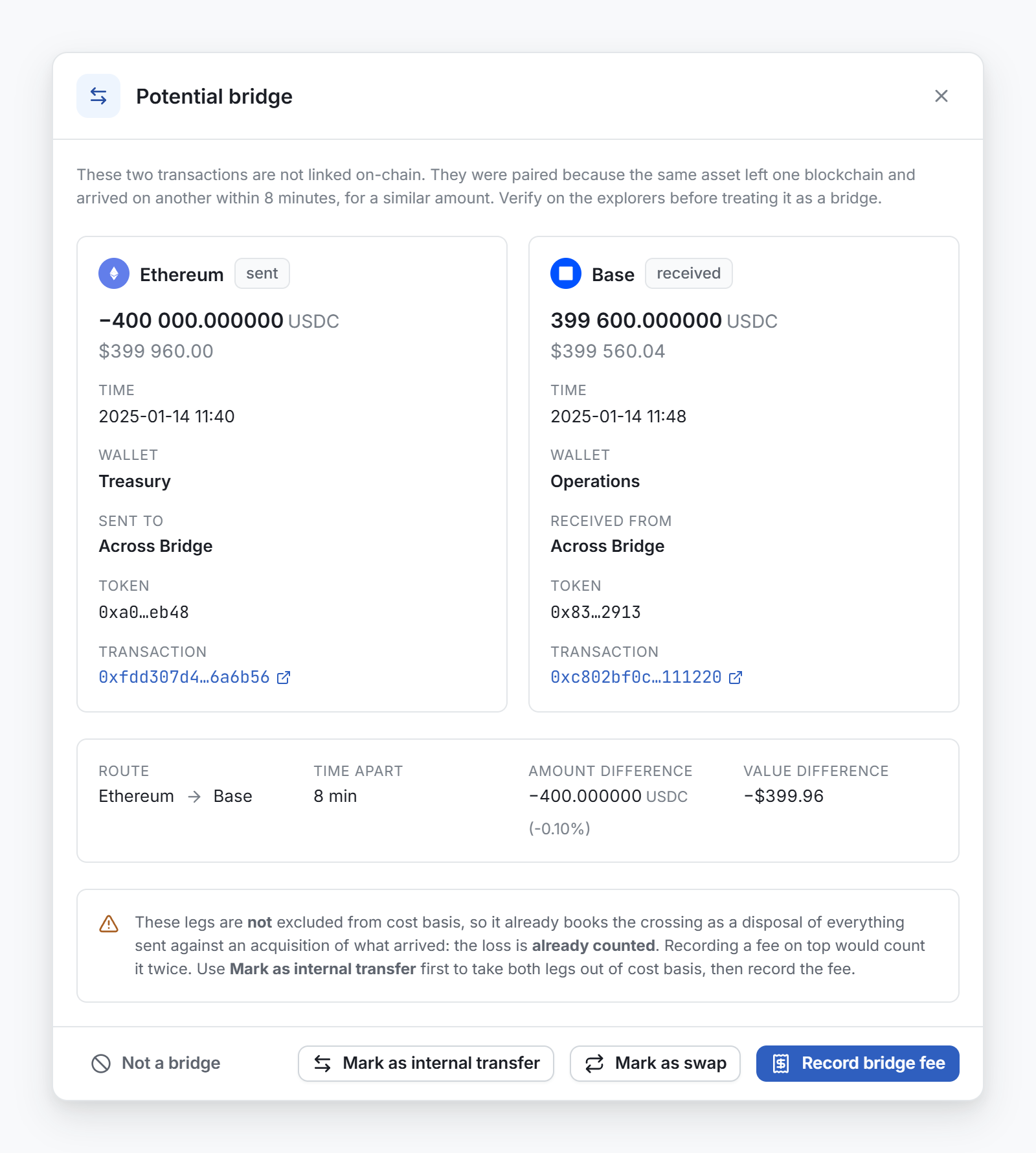
Open both transactions on the explorers before you decide.
Decide what the pair was
| Choice | When | What it does |
|---|---|---|
| Mark as internal transfer | Your own asset arrived on another platform. | Sets the Internal transfer category by hand on both movements. Both leave cost basis, and the pair leaves the tab. |
| Mark as swap | The crossing gave you a different asset. | Sets the Swap category by hand on both movements. Both stay in cost basis: a disposal and an acquisition. The pair stays in the tab. |
| Record bridge fee | After you mark the pair as an internal transfer, if less arrived than left. | Records the difference as a fee. See below. |
| Not a bridge | The two transactions are not related. | Removes the flag from both movements. No category changes. |
Not a bridge rejects this pair only. The asset that left can still pair with another arrival. To learn why a transfer between your own accounts is not a disposal, see Internal transfers.
Bridge fees
A bridge usually keeps a part of what it carries. When both sides are an internal transfer, cost basis ignores them, so the tokens the bridge kept are missing from your books. Record bridge fee puts them back.
The fee is a new outflow from the account that sent the asset, dated when it was sent, for the amount that left minus the amount that arrived. Its method reads Bridge fee. Cost basis reads it as a disposal. Categorize it like any other movement.
The button is not available when the same amount or more arrived. A pair gets one fee only: after the fee is recorded, the button is not available. If the fee falls inside a closed period, Conta Finance asks you to confirm first. See Close a period.
Record bridge fees automatically
Turn on Record bridge fees automatically in Organization settings to let Conta Finance record each fee for you. It is off by default. See Organization settings.
With the setting on:
- The fee is recorded when both sides of a pair have the Internal transfer category, whether the window, a rule or a link set it.
- Record bridge fee is not available. Its tooltip tells you why.
- A crossing inside a closed period is left alone.
Undo a decision
- Not a bridge. Select Undo before you close the window. The pair is detected again. After you close the window, the pair does not come back.
- A mark. Open the Manually categorized tab of the Rules page and select Remove the manual category for both movements. They go back to the rules. See The Rules page.
- A fee. Select the fee movement in the ledger and select Delete. With Record bridge fees automatically on, the fee can be recorded again the next time a category changes.