Potential spam
Why Conta Finance flags some transfers as potential spam, what the flag hides, and how to see the flagged transactions.
Where to find it:your-organization.conta.financeTransactionsPotential spam
Some token contracts write false transfers into the history of an account. The history then shows a payment that your account never made, often to an address that looks like one you use. Other tokens arrive in your account uninvited, with the symbol of a real coin or with a web address as their symbol. Conta Finance flags the transfers of these tokens as potential spam and keeps them out of your working views.
Why a transfer is flagged
Conta Finance has three rules. Each rule applies to some blockchains only.
The flag applies to the whole token contract. When a rule flags a token, every transfer of that token is flagged, the transfers into your accounts too.
An account cannot send a token it never received
If the ledger shows one of your accounts sending a token that the account never received, that transfer is forged. A contract wrote a record that names your account as the sender. This is the setup of address poisoning: the false payment goes to a lookalike address, in the hope that you copy it later.
Where the rule applies:
- EVM blockchains only, such as Ethereum. On these blockchains, every credit to an account leaves a transaction behind, so the rule is safe.
- Not on other platforms. On some blockchains an account can receive an asset with no transaction, so a real token could look forged there. Conta Finance does not judge them with this rule.
- Not the first movement of an account. An account added in the middle of its history opens with a balance that no transfer explains.
This rule finds forged payments only. A token that only arrived in your account, such as an airdrop, is not flagged by it.
A token cannot use the symbol of the blockchain's own coin
On Sui and on Aptos, anybody can create a token, give it the symbol of the blockchain's own coin, and send it to your account. A token on Aptos that is not APT and has the symbol APT is a copy. Conta Finance flags it, and does the same for a copy of SUI on Sui.
Where the rule applies:
- Sui and Aptos only. On these blockchains the coin has one identity, so another token with its symbol is a copy.
- Not on other platforms. On some blockchains a real token has the same symbol as the coin, for example POL on Polygon.
- Only an exact copy of the symbol. A token with the symbol LAPT or stAPT is not flagged.
A token cannot use a web address as its symbol
Many airdropped tokens have a web address in their symbol, for example SUI-AIRDROP.NET on Sui, or "Visit website stethLido.win to claim rewards" on Ethereum. The address is the purpose of the airdrop: it leads to a site that asks you to connect your wallet. Conta Finance flags a token whose symbol holds a web address.
Where the rule applies:
- Sui, Aptos and EVM blockchains such as Ethereum. Solana is not judged: its transfers do not carry the symbol.
- Not a token that the ledger shows with its symbol. The ledger shows a symbol only for a token in your token catalog. The catalog holds a token when a price source knows it, or when you added it. Real tokens with a web address as their symbol are in that case.
- Only the symbol. A token that has the web address in its name, and a plain symbol, is not flagged.
The symbol that the rules read
The last two rules read the symbol that the token has on the blockchain. The Transactions page does not show that symbol. Conta Finance shows a symbol only for a token in your token catalog, so a flagged token shows with its contract address and no symbol.
Many airdrops have a plain symbol, and no rule flags them. Do not trust a token because it has no flag.
What the flag changes
The flag changes what the ledger shows, and nothing else.
- A flagged transaction does not show in All or in the other working views.
- A transaction is hidden only when all its movements, gas aside, are flagged. One real movement keeps the whole transaction in view.
- Balances, cost basis and reconciliation do not read the flag. A forged transfer never moved a real balance, so it was never in your books. An airdropped token that arrived in your account stays in its balance, because the account does hold it.
See the flagged transactions
There are two ways:
- Open the Potential spam tab. It lists every flagged transaction, with its own count.
- Open All filters and tick Include potential spam in the Exceptions section. The flagged transactions then show inline in every tab, and a chip reads Including potential spam.
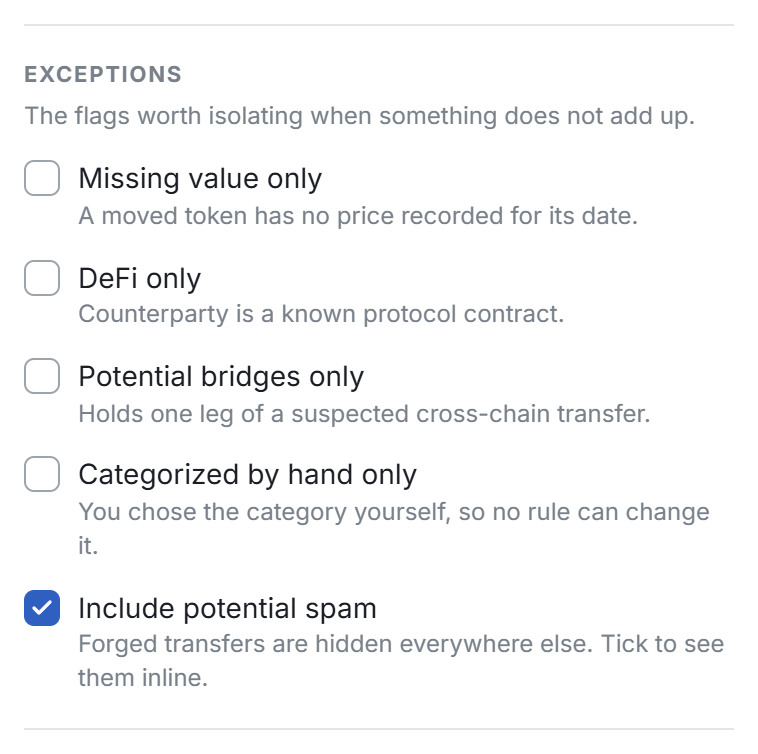
In the Potential spam tab, the box is ticked and you cannot change it, because the tab is the list of flagged transactions.
Ignore a spam token
The flag does not remove the token from the Tokens page. To take a spam token out of that list, ignore it:
- On the Tokens page, select Ignore token in the row menu, or Ignore contract for one contract.
An ignored token leaves the Tokens list, and Conta Finance stops looking for its price. It does not hide the transactions of the token. See Fix a token with no price.
A real token is flagged
If a token you know is real shows in Potential spam, mark it as not spam. You need Read and edit access.
- Open the Potential spam tab.
- Open Flagged tokens, above the table. It lists each flagged token, its platform and why it is flagged.
- In the row of the token, select Not spam.
The transactions of the token show in the ledger again at once. The token stays in the list as Marked as real. To flag it again, select Mark as spam again.