Sessions and signing out
How long you stay signed in, how to see the browsers where you are signed in, and how to sign out of one organization, one browser or everywhere.
Where to find it:accounts.conta.financeYour accountSecurity and sessions
Each browser where you sign in at accounts.conta.finance has a session. The session lets you open your organizations without a new sign-in.
How long a session lasts
A session ends:
- after 12 hours with no use, or
- 30 days after the sign-in, even if you use it every day.
Then you sign in again. If a page of accounts.conta.finance is open when the session ends, the next action sends you to the sign-in page. After the sign-in, you come back to the same page.
See your sessions
- Go to accounts.conta.finance.
- Select your picture at the top right, then Security and sessions.
- Go to Active sessions.
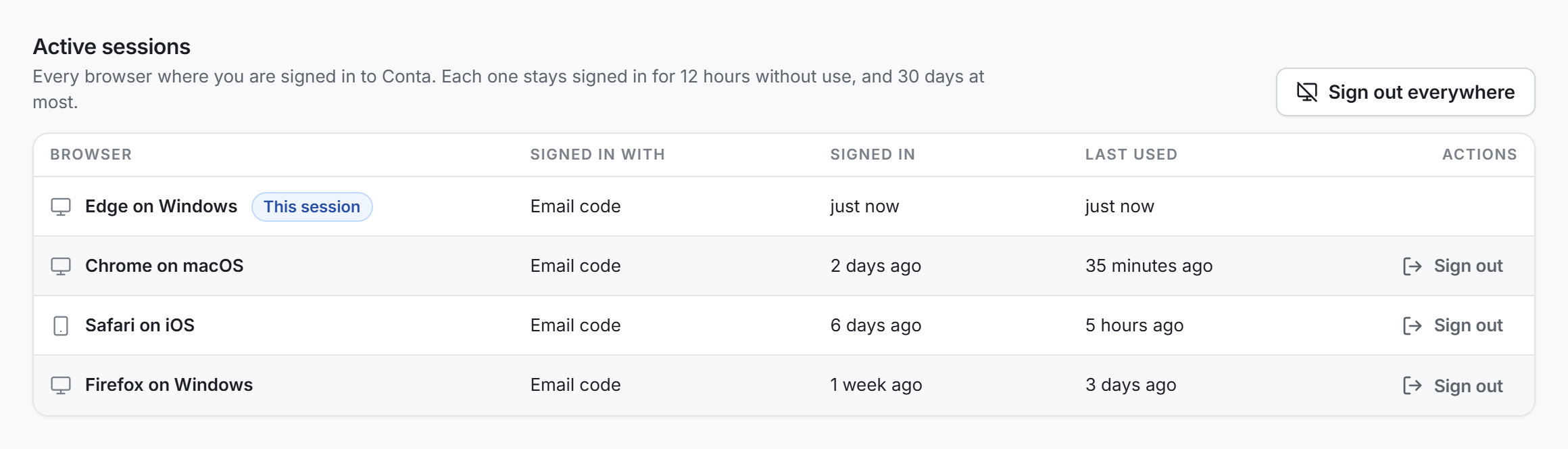
| Column | What it shows |
|---|---|
| Browser | The browser and the system, such as "Chrome on macOS". The browser you use now shows This session. |
| Signed in with | Email code, Microsoft or Google. |
| Signed in | When the session started. |
| Last used | When the session was last used. |
If you do not know a session, sign it out. Then turn on two-factor authentication. See Turn on two-factor authentication.
Sign out of one browser
- In Active sessions, find the row of the browser.
- Select Sign out on that row.
That session ends at once. Every organization open in that browser signs out within 5 minutes. The row of This session has no Sign out button: use the menu of your picture instead.
Sign out everywhere
Sign out everywhere is in Active sessions only. It is not in the menu of your picture.
- In Active sessions, select Sign out everywhere.
- Read the window, then select Sign out everywhere.
- If the Confirm it is you window opens, confirm it. See Confirm it is you.
Every session of yours ends, on every device, this one included. Every organization you have open signs you out within 5 minutes. Every AI client you connected is disconnected too. You land on the sign-in page.
Sign out of one organization
In an organization, select your picture at the top right, then Sign out of and the name of the organization.
You sign out of that organization only. Your session at accounts.conta.finance stays, so you land on it, still signed in. Your other organizations stay open.
Sign out of accounts.conta.finance
At accounts.conta.finance, select your picture at the top right, then Sign out. This ends the session of this browser. The organizations open in this browser sign out within 5 minutes.
| What you select | Where | What ends |
|---|---|---|
| Sign out of and the organization | In an organization | That organization, in this browser |
| Sign out | accounts.conta.finance, menu of your picture | The session of this browser |
| Sign out on a row | Active sessions | The session of that browser |
| Sign out everywhere | Active sessions | Every session, on every device, and every AI client you connected |